IRS Form 8554 Instructions
Enrolled agents are tax professionals recognized by the Internal Revenue Service as having fulfilled the expertise requirements to represent taxpayers for tax purposes. However, enrolled agents must request to renew their credentials every three years by filing IRS Form 8554, Application for Renewal of Enrollment to Practice Before the Internal Revenue Service.
In this article, we’ll walk through everything you need to know about IRS Form 8554, including:
- How to complete and file IRS Form 8554
- Continuing education requirements
- Frequently asked questions
Let’s begin by taking a look at IRS Form 8554 itself.
Table of contents
How do I complete IRS Form 8554?
This tax form has 3 parts:
Before we get to Part 1, there is some important information at the top of IRS Form 8554, worth reviewing.
Important things to know before filing IRS Form 8554
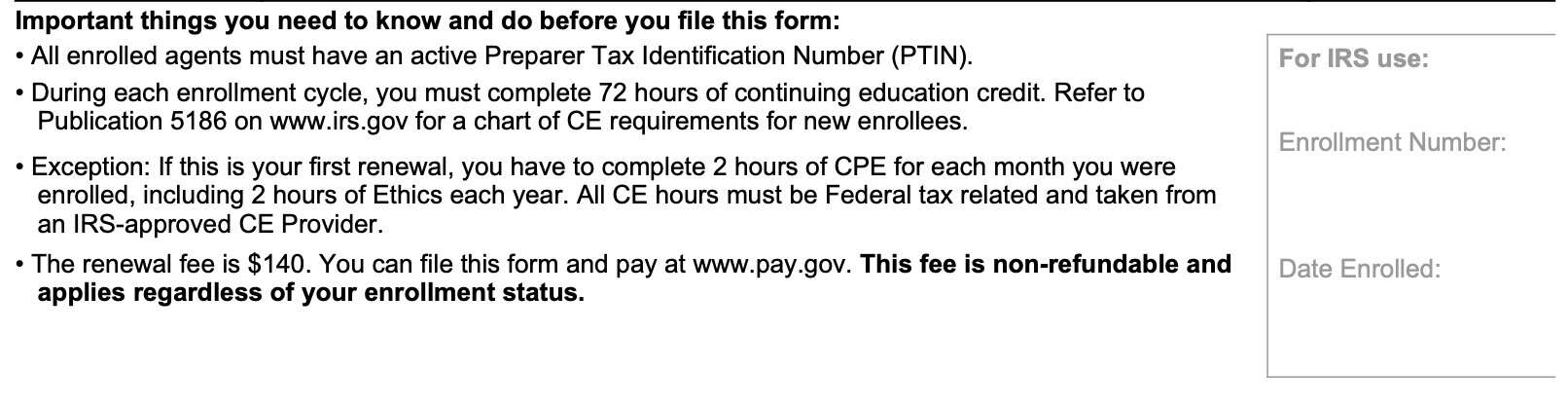
Here are several things that every enrolled agent must be aware of before filing IRS Form 8554:
- All enrolled agents must have an active Preparer Tax Identification Number (PTIN).
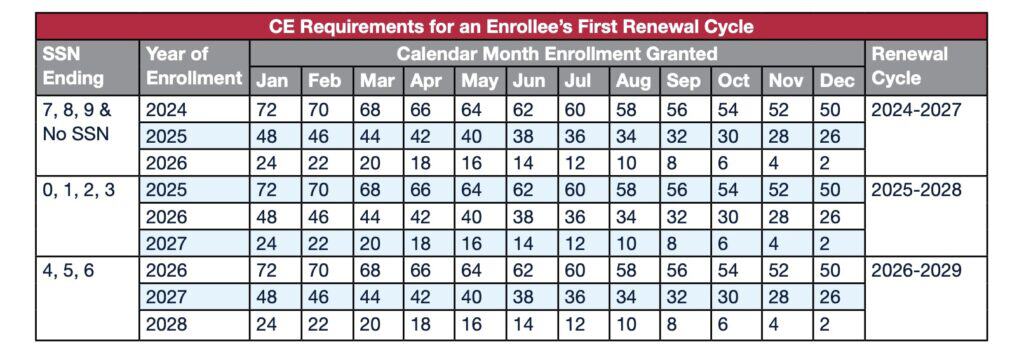
- During each enrollment cycle, you must complete 72 hours of continuing education credit. IRS Publication 5186 contains a chart of CE requirements for new enrollees (see below)
- Exception: If this is your first renewal, you have to complete 2 hours of CE for each month you were enrolled, including 2 hours of Ethics each year. All CE hours must be Federal tax related and taken from an IRS-approved continuing education Provider.
- The renewal fee is $140. You can file this form and pay at www.pay.gov. This non-refundable fee applies regardless of your EA status.
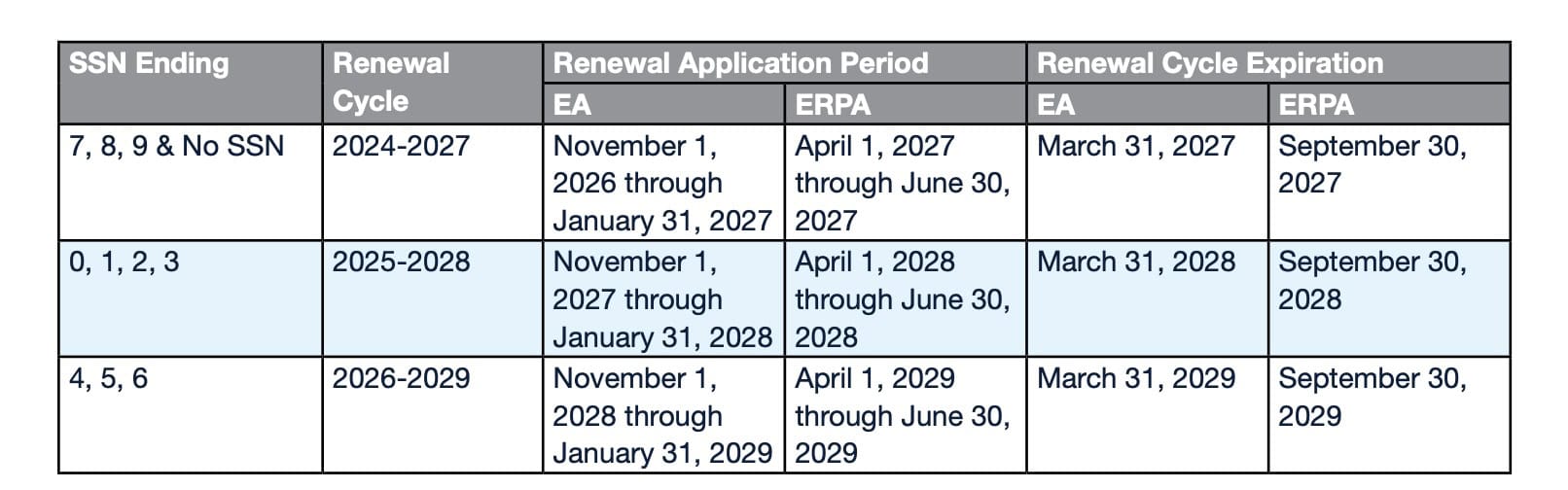
Below are two charts from IRS Publication 5186 that illustrate CE timelines and requirements.
CE Requirements for an enrollee’s first renewal cycle
First time enrollees can use the following chart to determine their CE requirements for the upcoming renewal cycle.
For example, John Doe’s Social Security number ends in 7, and he obtained his enrolled agent designation in May 2024. This chart indicates that his three-year enrollment cycle finishes in 2027, and that he must complete 64 CE credits in order to obtain his renewal.
Enrolled Agent Renewal Periods by SSN
Most enrolled agents are familiar with this chart. For example, my SSN ends in 6, and I just completed my renewal for the preceding renewal period (2023 through 2026). This means that my next renewal application period is from November 1, 2028 through January 31, 2029. My enrolled agent status expires on March 31, 2029.
Let’s proceed to Part 1.
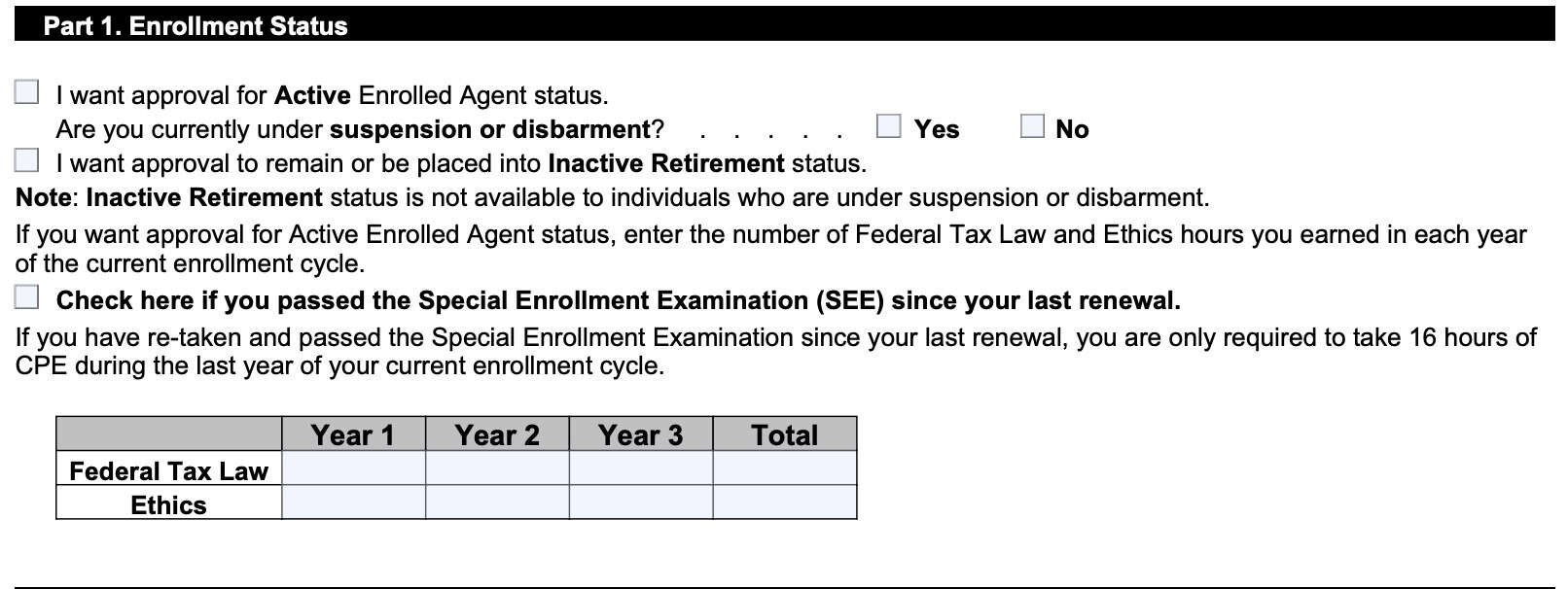
Part 1: Enrollment Status
Let’s go through Part 1, step by step.
Status
Check the box indicating whether you want approval for:
- Active status
- Inactive retirement status
Active status
An enrolled agent in active status is allowed to practice before the Internal Revenue Service as a tax practitioner, and is able to publicly present himself or herself as an active enrolled agent, subject to rules provided in Treasury Department Circular 230, Regulations Regarding Practice Before the Internal Revenue Service.
Inactive retirement status
Instead of remaining in active status, an enrolled agent may request to be placed in Inactive Retirement status. This means that you are not allowed to practice as an active enrolled agent, nor hold yourself out to be one.
Neither EAs nor ERPAs are required to maintain CE while in Inactive Retirement status; however, they are still required to complete the renewal application form and pay the renewal fee each cycle they remain in inactive status.
An EA in Inactive Retirement status is no longer authorized to practice before the IRS.
In order to be placed in Active status, an enrolled agent must:
- Refile IRS Form 8554, requesting to be placed into Active status
- Ensure his or her Preparer Tax Identification Number (PTIN) is active
- Pay a renewal fee of $140
- Provide documentation that he or she has completed the continuing education requirements
Check if you have passed the SEE since your last renewal
Check the box if you have re-taken and passed the Special Enrollment Examination since your last renewal. If this is the case, then you are only required to take 16 hours of continuing professional education credits during the last year of your current enrollment cycle.
Hours reported
Enter the total amount, by calendar year, of the following courses:
- Federal Tax law
- Ethics
Enter the total of federal tax law and ethics hours under the Total column.
Part 2: Identifying Information
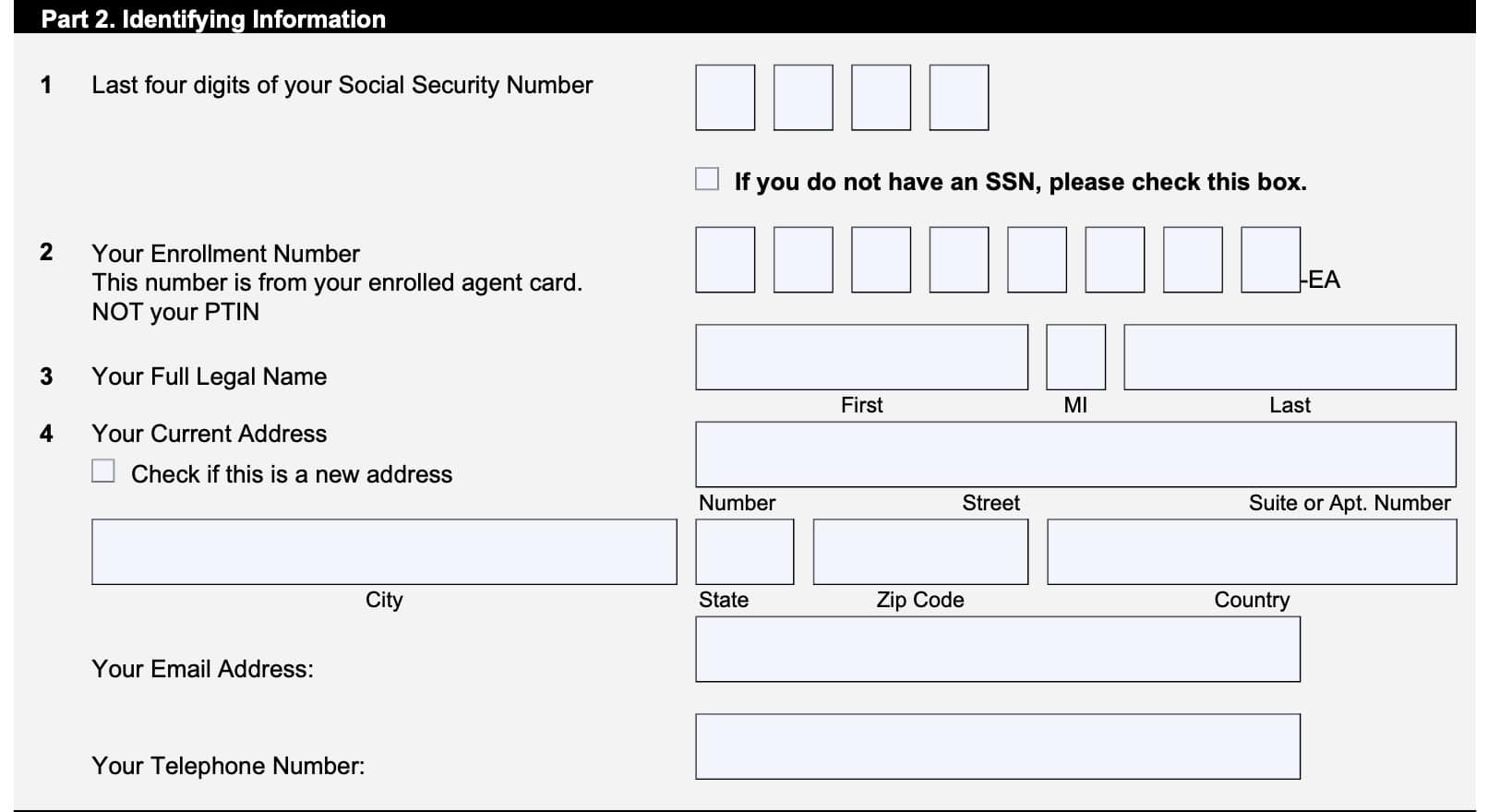
In Part 2, you will enter necessary information for your PTIN renewal.
Line 1
Enter the last four digits of your Social Security number. If you do not have an SSN, then check the available box.
Line 2: Enrollment number
Enter your enrollment number, which should be the number from your enrolled agent card. Do not enter your PTIN here.
Line 3: Full legal name
Enter your complete legal name here.
Line 4: Current address
Enter your complete address and contact information, such as your email address and telephone number, in the space provided. If this is a new address, then check the box indicated.

Line 5: Centralized Authorization File (CAF) number
If the IRS has ever assigned a CAF number to you, then enter the CAF number(s) in the space(s) provided. If there is insufficient space for the CAF numbers that the Internal Revenue Service has assigned to you, then attach additional pages to your Form 8554.
What is a CAF number?
A CAF number is a unique nine-digit identification number and is assigned the first time you file a third-party authorization with the IRS. The IRS will send a letter informing you of your assigned CAF number, which you should use for future authorizations.

Line 6: Employer identification number (EIN)
If you have an employer identification number (EIN), then enter your EIN, business name, and business address in the spaces provided.
This line contains space for up to 3 separate businesses. If you need to include additional businesses, then attach a separate sheet containing the additional information.
Since you have become an enrolled agent or your last renewal of enrollment (whichever is later)
These questions are a series of Yes/No questions with regards to events that may have happened since either:
- You became an enrolled agent, or
- Your last enrollment renewal
If indicated, you may need to provide additional documentation to explain the circumstances concerning your answer.
Line 7: Taxes
Are you current with your individual and business taxes, including any corporate and employment tax obligations?
If No, provide a written explanation.
Line 8: Federal or state Sanctions
Have you been sanctioned by a federal or state licensing authority?
If Yes, provide a written explanation.
Line 9: Denial of admission to practice
Has any application you filed with a court, government department, commission, or agency for admission to practice ever been denied?
If Yes, provide a written explanation.
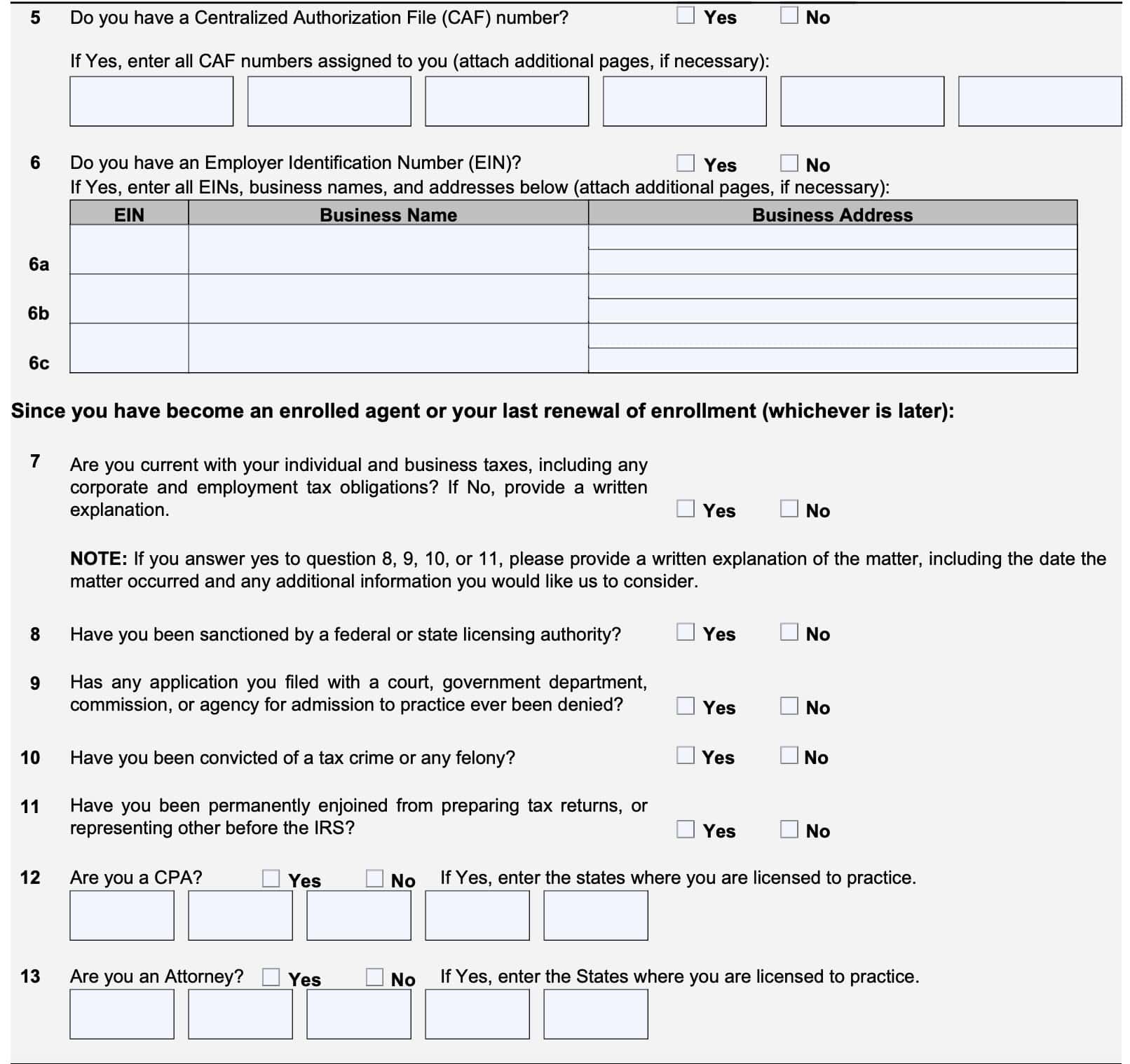
Line 10: Tax crimes or felony convictions
Have you been convicted of a tax crime or any felony?
If Yes, provide a written explanation.
Line 11: Permanent enjoinment
Have you been permanently enjoined from preparing tax returns, or representing other before the IRS?
If Yes, provide a written explanation.
Line 12: Are you a CPA?
If you are a certified public accountant, then check Yes and enter the state(s) where you are licensed to practice. The IRS reserves the right to check with state boards of accountancy for reported professional conduct violations or disciplinary action history.
Line 13: Are you an attorney?
If you are a licensed attorney, then check Yes and enter the state(s) where you are licensed to practice. The IRS reserves the right to check with state bar associations for reported professional conduct violations or disciplinary action history.
Part 3: Sign Here
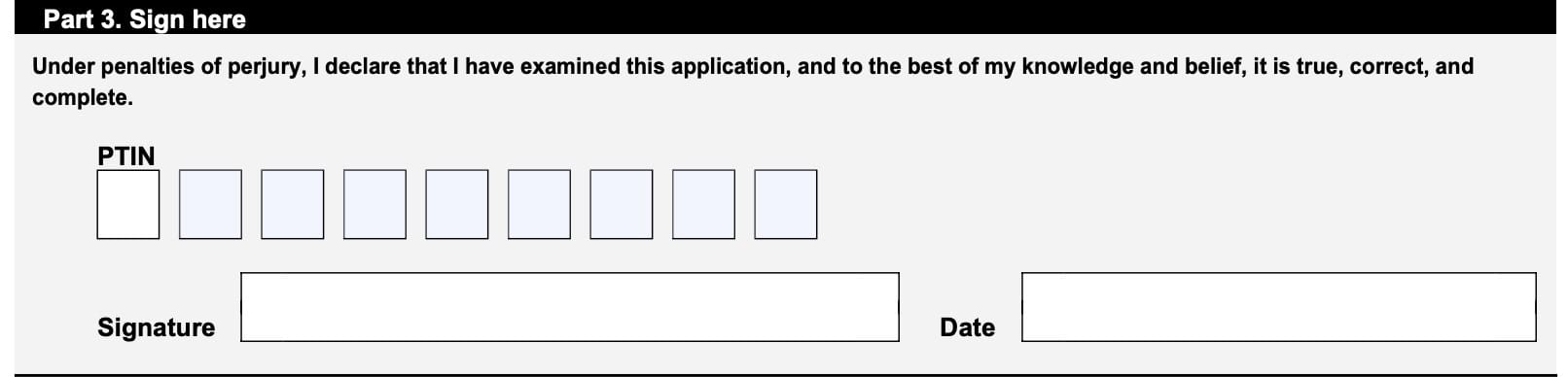
Enter your PTIN in the space provided. Sign and date where indicated.
Keep in mind that your when you sign IRS Form 8554, you do so under penalties of perjury that the information is true, correct, and complete, to the best of your knowledge.
Filing considerations
Below are some things that tax professionals should consider when renewing their tax pro status.
Do I need to file IRS Form 8554 in paper form?
No. You can renew your status as an enrolled agent or through your IRS account.
Can I use IRS Form 8554 to renew my status as an enrolled retirement plan agent?
No. Enrolled retirement plan agents need to file IRS Form 8554-EP to renew their status as an enrolled retirement plan agent (ERPA).
How do I file IRS Form 8554?
If you are filing IRS Form 8554 by mail, you can send your completed form to:
Internal Revenue Service
Enrolled Agent Policy and Management
127 International Dr Room – EA125
Franklin, TN 37067
Be sure to enclose a check or money order in the amount of $140 made payable to the United States Treasury.
Video walkthrough

Frequently asked questions
An enrolled agent is a person who has earned the privilege of representing taxpayers before the Internal Revenue Service by either passing a three-part comprehensive IRS test covering individual and business tax returns, or through experience as a former IRS employee.
IRS Form 8554, Application for Renewal of Enrollment to Practice Before the Internal Revenue Service, is the form that enrolled agents must complete in order to renew their enrolled agent credentials. Enrolled agents may complete this application online or in paper form.
The nonrefundable renewal fee is $140, for a 3 year renewal period.
Where can I find IRS Form 8554?
You can find copies of various IRS forms, such as IRS Form 8554, on the IRS website. For your convenience, we’ve included the latest version of IRS Form 8554 here, in this article.