IRS Form 8879-EMP Instructions
When filing an employment tax return, the taxpayer may choose to allow their tax professional to electronically sign the federal tax returns on his or her behalf. The donor can do this by using IRS Form 8879-EMP, E-file Authorization for Employment Tax Returns.
In this article, we’ll go over what you need to know about IRS Form 8879-EMP, including:
- How to complete IRS Form 8879-EMP
- Taxpayer responsibilities
- Frequently asked questions
Let’s start with an overview of how to complete this tax form.
Table of contents
How do I complete IRS Form 8879-EMP?
There are three parts to IRS Form 8879-EMP:
- Part I: Type of Return and Return Information
- Part II: Taxpayer Declaration and Signature Authorization
- Part III: Certification and Authentication
Before we begin with Part I, let’s take a look at the information fields at the very top of IRS Form 8879-EMP.
Top of IRS Form 8879-EMP
At the very top of IRS Form 8879-EMP, there are a few information fields to complete.
Reporting period
Enter the year or period of your employment tax return. If using tax preparation software, your software should automatically complete this field.
name
Enter the employer’s name, as shown on the employment tax return.
Employer identification number
Enter the employer ID number, or EIN, in this field.
Part I: Type of Return and Return Information
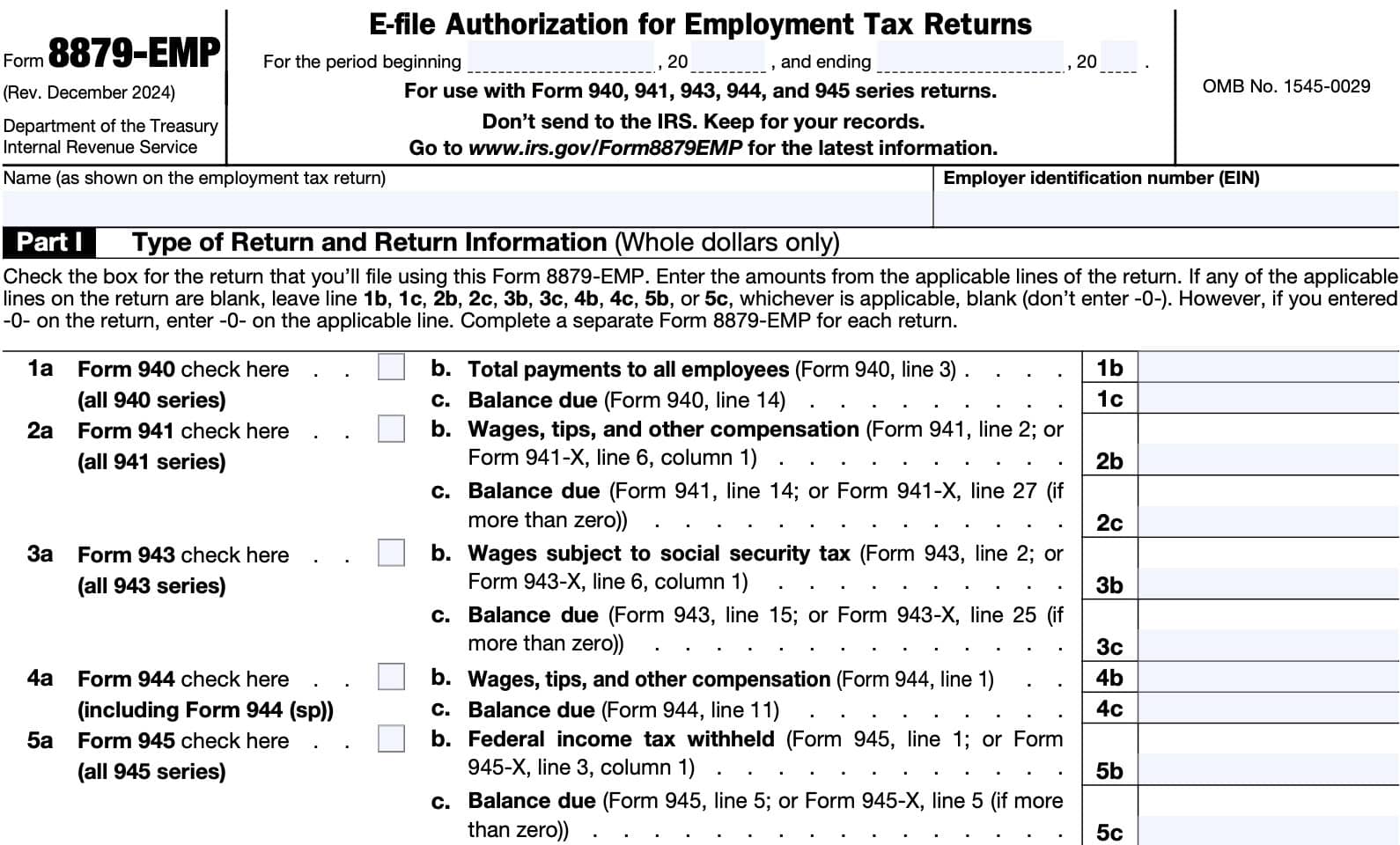
In Part I, we’ll enter certain tax return information from the employment tax return. When completing IRS Form 8879-EMP, you will need to check one of the boxes, based on which e-filed return you are submitting:
- Line 1a: Form 940 series
- Line 2a: Form 941 series
- Line 3a: Form 943 series
- Line 4a: Form 944 series
- Line 5a: Form 945 series
Below is detailed guidance for the electronic return data that you should provide, depending on the type of electronically filed return you plan to submit.
If any of the applicable lines your federal tax return are blank, then leave the corresponding line on IRS Form 8879-EMP blank as well. Do not enter -0- unless that is the value on the applicable line in the electronic tax return itself.
Line 1: Form 940
If you are completing IRS Form 940, Employer’s Annual Federal Unemployment (FUTA) Tax Return, check Box 1a.
Then complete Lines 1b and 1c as indicated below.
Line 1b: Total payments to all employees
Enter the total amount of payments made to all employees, from Line 3 of your Form 940.
Line 1c: Balance due
Enter the balance due from Line 14.
Line 2: Form 941
If you are completing either IRS Form 941, Employer’s Annual Federal Unemployment (FUTA) Tax Return, or IRS Form 941-X, Adjusted Employer’s Quarterly Federal Tax Return or Claim for Refund, check Box 2a.
Then complete Lines 2b and 2c as indicated below.
Line 2b: wages, tips, and other compensation
Enter the wages, tips, and other compensation information from either:
- IRS Form 941, Line 2
- IRS Form 941-X, Line 6, Column 1
Line 2c: Balance due
Enter the balance due from either:
- IRS Form 941, Line 14
- IRS Form 941-X, Line 27 (if greater than zero)
Line 3: Form 943
If you are completing IRS Form 943, Employer’s Annual Federal Unemployment (FUTA) Tax Return or IRS Form 943-X, Adjusted Employer’s Annual Federal Tax Return for Agricultural Employees or Claim for Refund, check Box 3a.
Then complete Lines 3b and 3c as indicated below.
Line 3b: Wages subject to Social Security tax
Enter the total wages subject to Social Security tax from either:
- IRS Form 943, Line 2, or
- IRS Form 943-X, Line 6, Column 1
Line 3c: Balance due
In Line 3c, enter the balance due amount from either:
- IRS Form 943, Line 15, or
- IRS Form 943-X, Line 25 (if greater than zero)
Line 4: Form 944
If you are completing IRS Form 944, Employer’s Annual Federal Tax Return, check Box 4a.
Then complete Lines 4b and 4c as indicated below.
Line 4b: wages, tips, and other compensation
Enter the wages, tips, and other compensation information from Line 1.
Line 4c: Balance due
If there is a balance due, then enter the balance due amount from Line 11.
Line 5: Form 945
If you are completing IRS Form 945, Annual Return of Withheld Federal Income Tax, or IRS Form 945-X, Adjusted Annual Return of Withheld Federal Income Tax or Claim for Refund, check Box 5a.
Then complete Lines 5b and 5c as indicated below.
Line 5b: Federal income tax withheld
Enter the total amount of federal income taxes withheld from either:
- IRS Form 945, Line 1, or
- IRS Form 945-X, Line 3, Column 1
Line 5c: Balance due
Enter the balance due from either:
- IRS Form 945, Line 5
- IRS Form 945-X, Line 5 (if greater than zero)
Part II: Taxpayer Declaration and Signature Authorization
In Part II, we’ll go over the declaration and signature authorization of the taxpayer. Before we get into the instructions, we should take a moment to go over some of the IRS requirements outlined in the finer print.
What does the declaration say?
There are a few main points you should know here.
You may be subject to legal penalties
In the first line, you are declaring, under penalties of perjury, that:
- You have personally reviewed the tax return, and
- The tax return is true, correct, and complete, to the best of your knowledge
You’re giving certain permissions to your tax professional
In the declaration, you are giving your electronic return originator (ERO), transmitter, or intermediate service provider permission to send and receive certain information to the IRS.
Specifically, you are granting permission to receive:
- Acknowledgment of receipt or reason for rejection of the transmission (tax return)
- Reasons for delays in processing the tax return or tax refund
- Date of any refund that may be owed to the estate or trust
You’re giving the federal government permission to conduct electronic funds withdrawal from a bank account
If you owe employment taxes to the United States government, your electronic signature authorizes the U.S. Treasury, through its designated financial agent, take electronic payment of the employment tax bill.
The federal government will do this by direct debit from your financial institution account.
If you wish to revoke a payment, you must contact the financial agent no later than 2 business days prior to the payment or settlement date.

Taxpayer’s PIN
Once you’ve read the employment tax declaration, you may choose one of the available personal identification number (PIN) methods:
- ERO enters your PIN for you
- Enter your own PIN
Select the first box if you authorize your tax preparer to enter your PIN. You’ll enter the five-digit PIN on the electronic Form 8879-EMP, which your paid preparer will use to provide your IRS electronic signature.
Otherwise, you will enter your own PIN in the tax preparation software prior to electronic filing of the tax return. Your tax professional will file the electronic employment tax return using the practitioner PIN method.
Below the PIN, sign and date the form as the taxpayer.
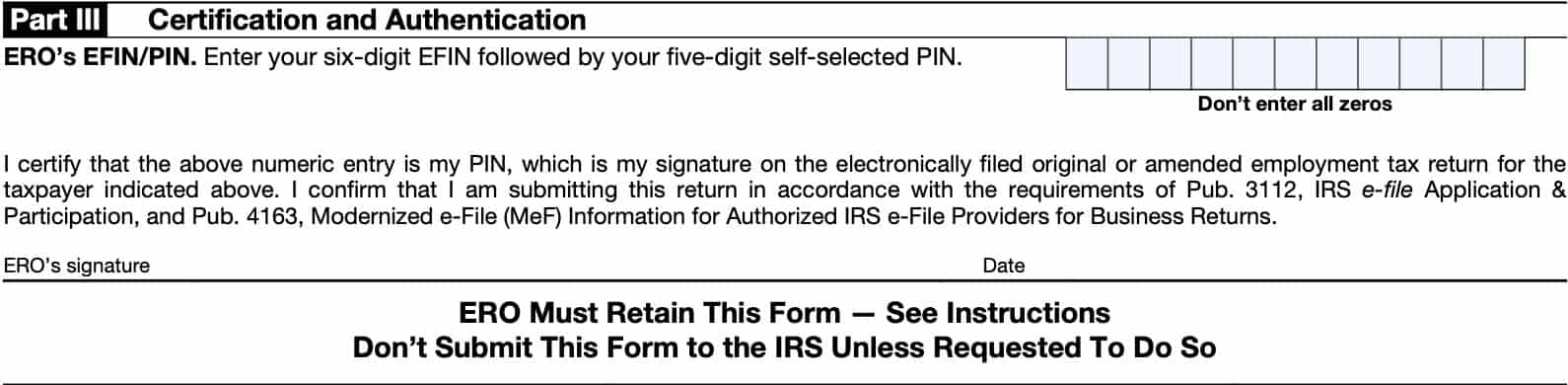
Part III: Certification and Authentication
In Part III, your tax return preparer will enter his or PIN, which consists of:
- The ERO’s six-digit electronic filing identification number (EFIN), followed by
- A five-digit PIN
Below this field, the ERO will sign and date the Form 8879-EMP.
Filing IRS Form 8879-EMP
As the taxpayer, there are a couple of things you may want to know about IRS Form 8879-EMP.
Your tax return preparer won’t send this form to the IRS
In fact, the form itself says in bold print, “Don’t send to the IRS. Keep for your records.” Your tax return preparer is required to keep this form for at least 3 years after the tax return is filed, or after the IRS has received the tax return, whichever is later.
You don’t have to complete IRS Form 8879-EMP
A taxpayer and an ERO use Form 8879-EMP when the taxpayer wants to use a personal identification number (PIN) to:
- Electronically sign an estate’s or trust’s electronic income tax return and,
- Consent to electronic funds withdrawal (direct debit), if applicable
Any employer who doesn’t want to use Form 8879-EMP must use IRS Form 8453-EMP, E-file Declaration for Employment Tax Returns.
Your tax preparer has certain responsibilities
According to the IRS instructions, your tax return preparer (or ERO) must do the following:
- Enter the name and EIN of the estate or trust at the top of the form;
- Complete Part I using the amounts from the estate’s or trust’s income tax return;
- Zero may be entered when appropriate
- Enter on the authorization line in Part II the ERO firm name if the ERO is authorized to enter the taxpayer’s PIN;
- Not the name of the individual preparing the return
- Give the taxpayer a copy of Form 8879-EMP for completion and review, and
- Acceptable delivery methods include hand delivery, U.S. mail, private delivery service, email, Internet website, and fax
- Complete Part III, including a signature and date
You have responsibilities as well
As the taxpayer, you must do the following:
- Verify the accuracy of the estate’s or trust’s prepared income tax return;
- Check the appropriate box in Part II to either:
- Authorize the ERO to enter the taxpayer’s PIN or
- Choose to enter it in person;
- Indicate or verify your PIN when authorizing the ERO to enter it
- The PIN must be five numbers other than all zeros
- Sign and date Part II; and
- Return the completed Form 8879-EMP to the ERO
The acceptable delivery methods include:
- Hand delivery
- U.S. mail
- Private delivery service
- Internet website, and
- Fax
Your tax return preparer will not submit the tax return until after he or she receives your signed form.
Video walkthrough

Frequently asked questions
IRS Form 8879-EMP, E-file Authorization for Employment Tax Returns, provides the IRS e-file signature authorization that allows a tax return preparer to file electronic returns on behalf of the employer.
According to the IRS instructions, a taxpayer does not have to complete IRS Form 8879-EMP. However, a taxpayer who does not use Form 8879-EMP must use Form 8453-EMP, E-file Declaration for Employment Tax Returns, for an IRS e-file return.
Where can I find IRS Form 8879-EMP?
You can find tax forms such as IRS Form 8879-EMP on the Internal Revenue Service website. For your convenience, we’ve enclosed the latest version of IRS Form 8879-EMP in this article, as a PDF file.