IRS Form 911 Instructions
If you’re facing a significant tax matter, struggling with financial difficulties, or experiencing a significant hardship caused by tax problems, you may need some representation. One way of getting that help is to use IRS Form 911 to formally request Taxpayer Advocate assistance.
This article will walk you through what you need to know about IRS Form 911, including:
- How to complete IRS Form 911 to request taxpayer assistance
- The Taxpayer Advocate Office and its role in helping taxpayers
- Frequently asked questions
Let’s start with step by step guidance on how to complete IRS Form 911.
Table of contents
How do I fill out Form 911?
There are 3 sections to the form for you to complete:
- Section I: Taxpayer Information
- Section II: Representative Information
- Section III: Initiating Employee Information
Although it’s mostly straightforward, we will walk you through this form, step by step. Let’s begin with the first section.
Section I: Taxpayer Information
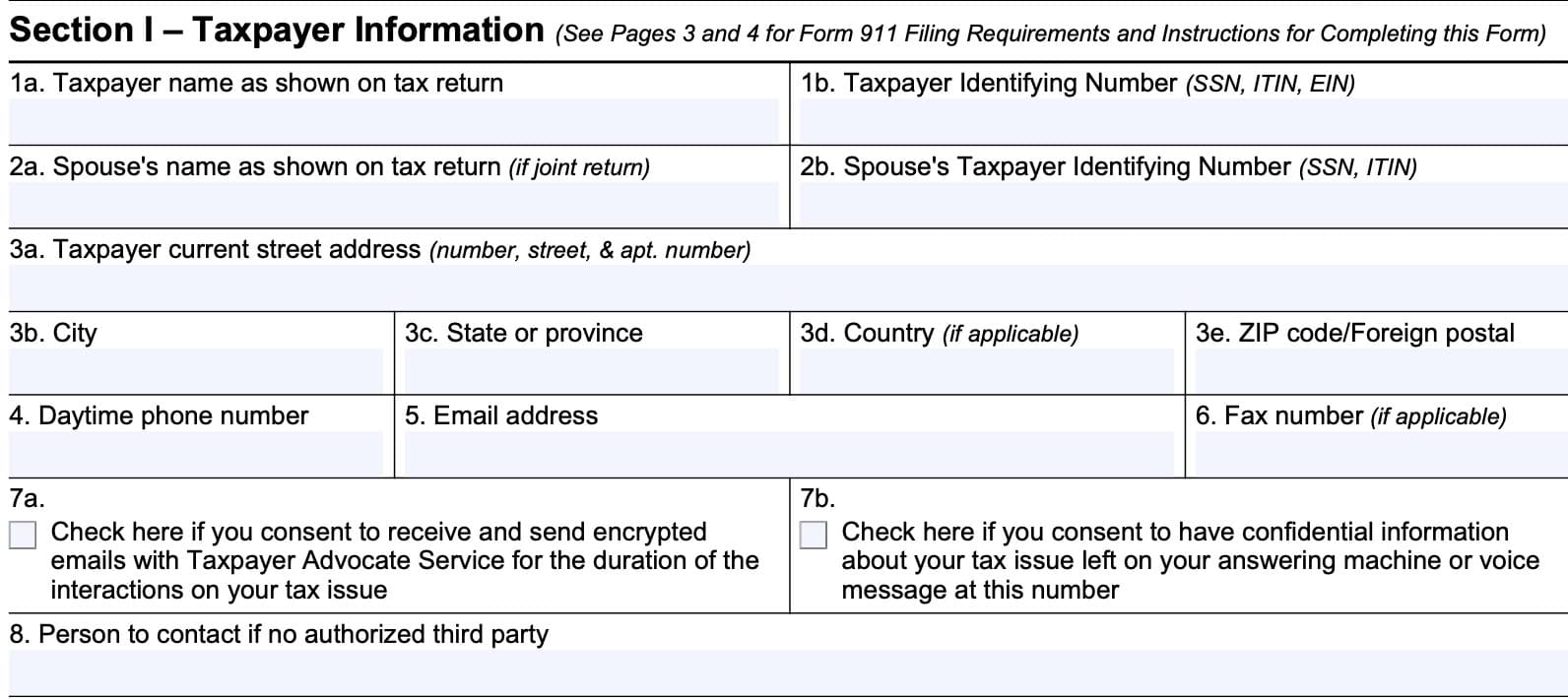
In Section I, you will fill in the first section with taxpayer information.
Line 1: Taxpayer name and ID number
In Lines 1a and 1b, enter your name and taxpayer identification number as shown on your federal tax return. This can be any of the following:
- Social Security number
- Employer identification number (EIN)
- Individual taxpayer identification number (ITIN)
Line 2: Spouse’s name and ID number
If requesting assistance as a married couple filing joint returns, enter your spouse’s name and ID number as they appear on your income tax return in the spaces provided.
Line 3: Taxpayer address, city, state, zip code
Enter your mailing address here.
If you recently moved, you may consider filing IRS Form 8822, Change of Address, to ensure that you receive IRS correspondence.
Line 4: Telephone number number
If you have a daytime phone number, enter it here.
Line 5: Email address
Enter your email address in Line 5.
Line 6: Fax number
If you have a fax number, enter it here.
Line 7
Check the first box if you consent to receive and send encrypted emails with the Taxpayer Advocate Service for the duration of interactions on your tax issue. This means that you would expect to send and receive communications with the IRS by email.
Check the second box if you consent to have confidential information about your tax issue left on your answering machine or voicemail.
Line 8: Person to contact if no authorized representative (Section II, below)
If you do not have an authorized representative, like a tax attorney or other tax professional, enter the name of someone you’ve authorized to act on your behalf.
For business entities, list the person authorized to represent the business.
Line 9: Language preference
If you have a language preference, other than English, enter it here.
Please note if you need special assistance (such as interpretive services for deaf and hard of hearing taxpayers).
Line 10: Tax form number
Insert the tax form number of the tax return you filed. For most individuals, this will probably be IRS Form 1040.
Line 11: Tax Year(s) or Periods
State the tax years or tax periods in question.
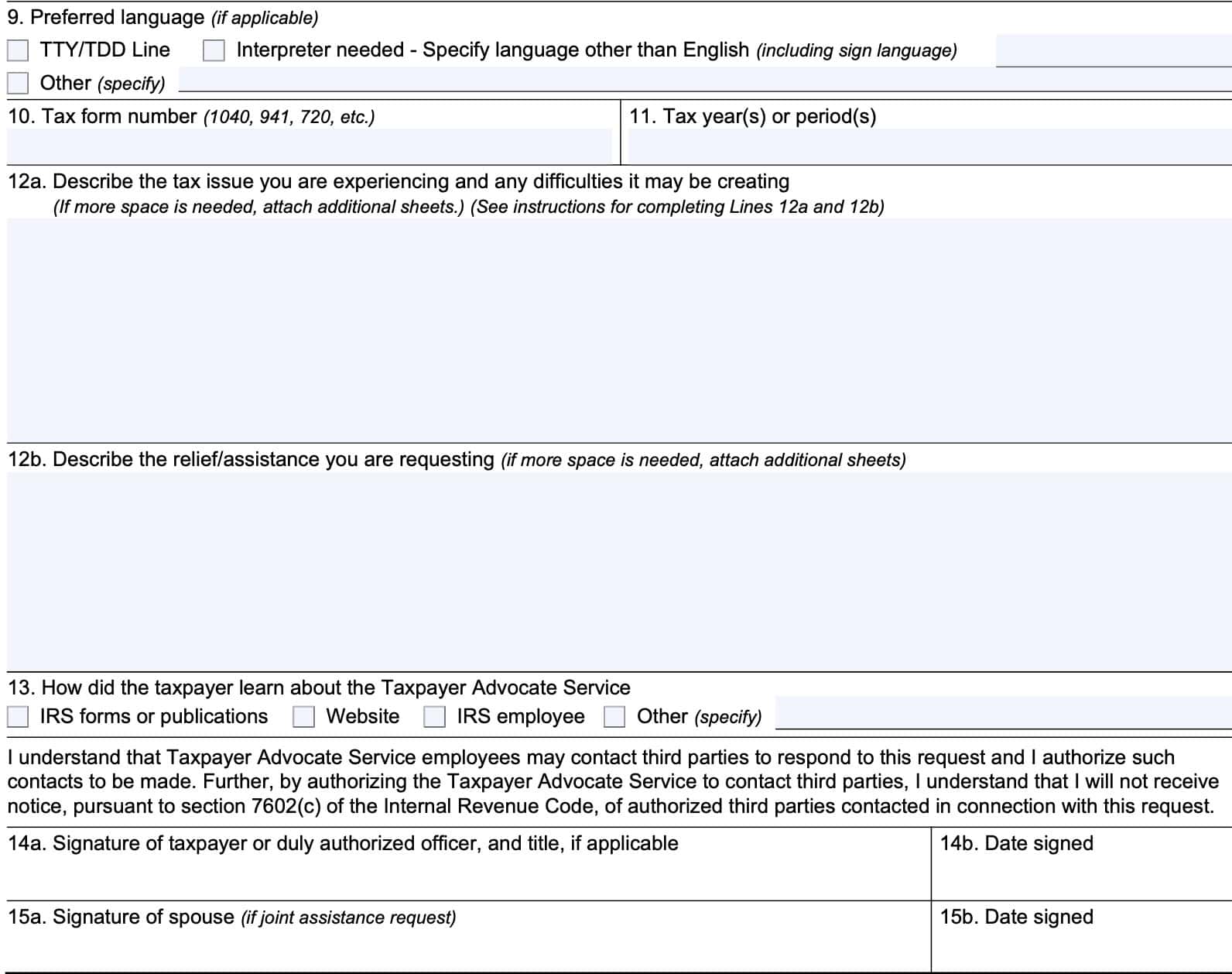
Line 12a
In plain language, write down what your tax problem is.
Specify the actions the IRS has taken (or not taken) to resolve the issue.
If the issue involves an IRS delay of more than 30 days in resolving your issue, indicate the date you first contacted the IRS for assistance. See Section III contains a specific list of TAS criteria.
Frivolous requests
Please note that the IRS has a policy about using IRS Form 911 for frivolous requests or frivolous arguments.
The IRS may impose a fine of up to $5,000 against taxpayers who use this form to file frivolous tax returns, or to use Form 911 in a frivolous manner. This fine may be imposed in cases without an understatement of tax.
IRS Publication 2105, Why Do I Have to Pay Taxes, contains more information.
Line 12b
In this line, describe the type of tax relief or assistance you are requesting.
Specify the action you want taken and believe necessary to resolve the issue. Furnish any documentation you believe would assist us in resolving the issue.
Line 13: How did you hear about the Taxpayer Advocate Service?
Select from one of the following options:
- IRS forms or publications
- Internal Revenue Service website
- IRS employee
- Other (provide additional information in the space provided)
Line 14: Taxpayer signature
Sign and date the form as instructed.
Line 15: Spouse signature
If applicable, have your spouse sign and date the form as instructed.
Section II: Representative Information
Taxpayers only need to complete Section II if they have an authorized representative. An authorized representative might be:
- A tax professional in good standing, such as an attorney, certified public accountant, or enrolled agent
- Officer or employee of the taxpayer’s organization
- Family member
- Unenrolled return preparer, with limited representation rights
In this case, you would complete Section II with the name, address, and contact information of the authorized representative.
Appointed representatives
Appointed representatives can be nominated using one of two forms:
- IRS Form 2848, Power of Attorney and Declaration of Representative
- Used to grant power of attorney privileges
- Designee may represent taxpayer in the case of an IRS issue
- IRS Form 8821, Tax Information Authorization
- May receive information only
- No representation powers
Power of Attorney
If you’ve nominated a power of attorney using IRS Form 2848, then you should complete this part of the form.
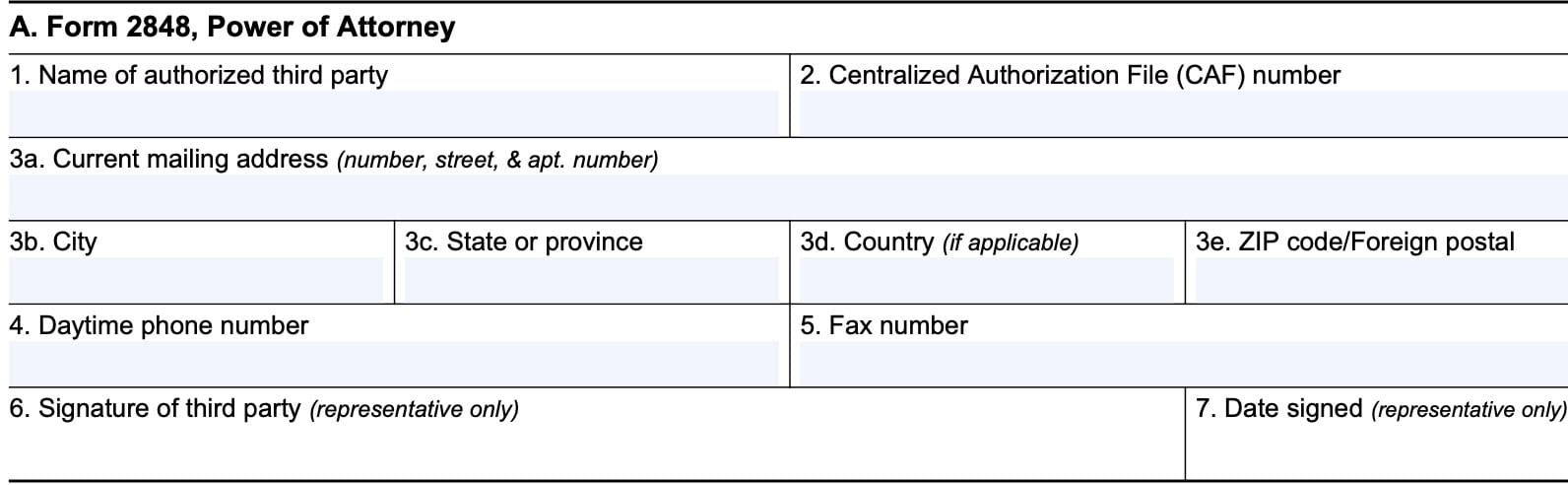
Line 1: Name of authorized third party
Enter the name of the third party here.
Line 2: Centralized authorization file (CAF) number
Enter your Centralized Authorization File (CAF) number here.
The CAF number is the unique number the IRS assigns to a representative after Form 2848 or Form 8821 is filed with an IRS office.
Line 3: Current mailing address
Enter the third party’s mailing address here.
Line 4: Daytime phone number
Enter a daytime telephone number. Check the box to indicate whether this is a cell phone.
Line 5: Fax number
If there is a fax number, enter it here.
Line 6: Signature of third party
The designated third party should sign here.
Line 7: Date signed
Enter the date of the signature in Line 6.

Tax information authorization
If you have authorized the IRS to release information to a third party on IRS Form 8821, then complete the information fields in this part of the Form 911 request.
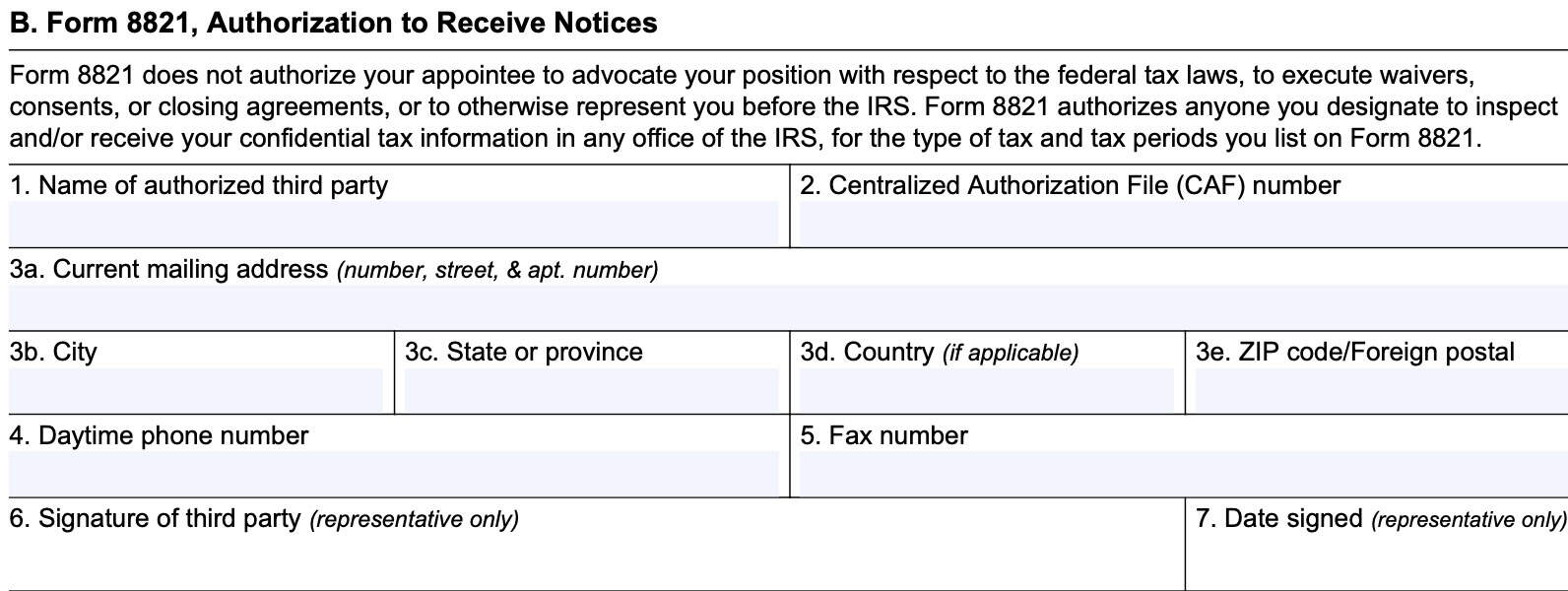
Line 1: Name of authorized third party
Enter the name of the third party here.
Line 2: Centralized authorization file (CAF) number
Enter your Centralized Authorization File (CAF) number here.
The CAF number is the unique number the IRS assigns to a representative after Form 2848 or Form 8821 is filed with an IRS office.
Line 3: Current mailing address
Enter the third party’s mailing address here.
Line 4: Daytime phone number
Enter a daytime telephone number. Check the box to indicate whether this is a cell phone.
Line 5: Fax number
If there is a fax number, enter it here.
Line 6: Signature of third party
The designated third party should sign here.
Line 7: Date signed
Enter the date of the signature in Line 6.

TAS Criteria
TAS criteria used to be outlined in prior versions of IRS Form 911. Although they are not present in the newest revision, this may help you determine how the IRS will prioritize your taxpayer request.
Here are the TAS criteria, as outlined in the form:
- The taxpayer is experiencing economic harm or is about to suffer economic harm
- The taxpayer is facing an immediate threat of adverse action
- The taxpayer will incur significant costs if relief is not granted
- The taxpayer will suffer irreparable injury or long-term adverse impact if relief is not granted
- The taxpayer has experienced a delay of more than 30 days to resolve a tax account problem
- The taxpayer did not receive a response or resolution to their problem or inquiry by the date promised
- A system or procedure has either failed to operate as intended or failed to resolve the taxpayer’s problem or dispute within the IRS
- The manner in which the tax laws are being administered raise considerations of equity or have impaired or will impair the taxpayer’s rights
- The NTA determines compelling public policy warrants assistance to an individual or group of taxpayers
Since you, as the taxpayer, do not have the chance to complete this information, your best opportunity lies in filling in Section I as completely as possible, and providing as much information about your tax case as you can.
Filing considerations
When requesting taxpayer assistance, there are a few things to keep in mind.
How do I file IRS Form 911?
There are several ways to file your taxpayer assistance request.
By fax
The quickest method is to fax the form to the closest local taxpayer advocate office.
Every state has at least one office, and you can find the contact information at the Taxpayer Advocate website.
By mail
You can also mail the form to your local taxpayer advocate office.
If you’re located Overseas
For taxpayers located overseas, you can fax this form to: (304) 707-9793. If you prefer to file by mail, you can mail your completed form to:
Taxpayer Advocate Service
Internal Revenue Service
PO Box 11996
San Juan, Puerto Rico 00922
How the taxpayer advocate service helps taxpayers
The Taxpayer Advocate website contains a number of resources to provide free help to taxpayers in the following situations:
- Online resources and additional information for tax payers who cannot find them on the IRS website
- Low-income taxpayer clinic to provide assistance for qualifying taxpayers
- Access to the latest tax news and information
According to the form instructions, the TAS office can help taxpayers who:
- Are experiencing a tax problem that is causing financial difficulty
- Have tried to resolve their issue with the IRS through normal channels without success, or
- Believe that an IRS system, process, or procedure isn’t working as it should be
The TAS does this by issuing a taxpayer assistance order (TAO).
Taxpayer assistance orders
The Taxpayer Advocate will issue a TAO to either:
- Direct a certain IRS action be taken, ceased or refrained from, OR
- Direct that the IRS escalate, expedite, or reconsider a taxpayer’s case
For example, a TAO may direct the revenue officer to temporarily cease collection actions until the case has been reviewed at a higher level.
Video walkthrough
Watch this instructional video to learn more about requesting assistance from the IRS’ Taxpayer Advocate Service by using IRS Form 911.

Frequently asked questions
IRS Form 911, Request for Taxpayer Advocate Service Assistance (and Application for Taxpayer Assistance Order), is the form that a taxpayer uses to formally request assistance from the Taxpayer Advocate office. Completing this form doesn’t guarantee taxpayer assistance, but it is a starting point.
The IRS Taxpayer Advocate Service is an independent organization within the Internal Revenue Service. The Taxpayer Advocate Office solely works on behalf of taxpayers when they’re frustrated with the normal IRS channels. Their focus is to ensure that each IRS employee is handling your tax issue within the scope of the Internal Revenue Manual and applicable laws.
Due to limited resources and the high volume of assistance requests, the TAS office has limited availability. For specific taxpayers facing immediate threat of adverse action that might result in financial hardship, or an IRS system issue, the TAS assistance might be available. The quickest method is to use the TAS online qualifier tool on the IRS website. Taxpayers can still file IRS Form 911 to request assistance.
How do I obtain a copy of IRS Form 911?
You may download a copy from the IRS website or by selecting the file below.