IRS Form 8453-TE Instructions
If you’re filing a tax return on behalf of a tax-exempt organization, you may see IRS Form 8453-TE, Tax Exempt Entity Declaration and Signature for Electronic Filing.
This article will walk you through what you should know about this tax form, including:
- What is IRS Form 8453-TE
- How to complete this form and when you should file it
- How to obtain a copy of this tax form
Let’s start with discussing exactly what IRS Form 8453-TE is.
Table of contents
How do I complete IRS Form 8453-TE?
There are three parts to this tax form:
- Part I: Type of Return and Return Information
- Part II: Declaration of Officer or Person Subject to Tax
- Part III: Declaration of Electronic Return Originator (ERO) and Paid Preparer
However, let’s start at the very top of the form, in the taxpayer information fields above Part I.
Taxpayer information
In this section, you’ll enter basic information about the tax return.
Calendar year or fiscal year
If the trust or estate operates on a calendar year basis, leave this area blank.
If the trust or estate operates on a fiscal year basis, enter the beginning and ending months of the fiscal year.
Fiscal year
A fiscal year is any tax year consisting of 12 consecutive months that end on the final day of any month except December. For example, the federal government operates on a fiscal year that runs from October 1 to September 30 of the following year.

Name of filer
Enter the name of the tax-exempt organization in this field.
Employer identification number
Enter the employer identification number (EIN) of the tax exempt entity in this field. An employer identification number is a 9-digit tax identification number for tax entities who are not individuals.
From here, let’s move on to Part I.
Part I: Type of Return and Return Information
In Part I, you will check the box that corresponds to the tax return that you are filing with Form 8453-TE, as well as the applicable amount from the tax return.
Part I notes
Form 8038-CP and Form 5330 filers may enter dollars and cents into their respective field. All other taxpayers should enter whole dollars only.
If you check one of the boxes, and the corresponding line from that tax return is blank, then leave the line to the right blank as well. For example, if you checked the box in Line 1a, but total revenue from Part VIII on Form 990 is blank, then leave Line 1b blank as well.
If you check one of the boxes, and the corresponding line from that tax return is zero, then enter zero on the line to the right as well. For example, if you checked the box in Line 1a, but total revenue from Part VIII on Form 990 is zero, then enter zero on Line 1b as well.
Line 1: IRS Form 990
Check this box if you’re filing IRS Form 990, Return of Organization Exempt from Income Tax.
Also, in Line 1b, enter the total revenue amount from Part VIII, Column (A), Line 12 on the Form 990.
Line 2: IRS Form 990-EZ
Check this box if you’re filing IRS Form 990-EZ, Short Form Return of Organization Exempt from Income Tax.
Also, in Line 2b, enter the total revenue amount from Line 9 on your Form 990-EZ.
Line 3: Form 1120-POL
Check this box if you’re filing IRS Form 1120-POL, U.S. Income Tax Return for Certain Political Organizations.
Also, in Line 3b, enter the total tax amount from Line 22 on the Form 1120-POL.
Line 4: Form 990-PF
Check this box if you’re filing IRS Form 990-PF, Return of Private Foundation or Section 4947(a)(1) Nonexempt Charitable Trust Treated as a Private Foundation.
Also, in Line 4b, enter the tax based on investment income, from Part V, Line 5 of your Form 990-PF.
Line 5: Form 8868
Check this box if you’re filing IRS Form 8868, Application for Extension of Time To File an Exempt Organization Return.
Also, in Line 5b, enter the balance due amount from Line 3c of your Form 8868.
Line 6: Form 990-T
Check this box if you’re filing IRS Form 990-T, Exempt Organization Business Income Tax Return (and proxy tax under Section 6033(e)).
Also, in Line 6b, enter the total tax amount from Part III, Line 4 of your Form 990-T.
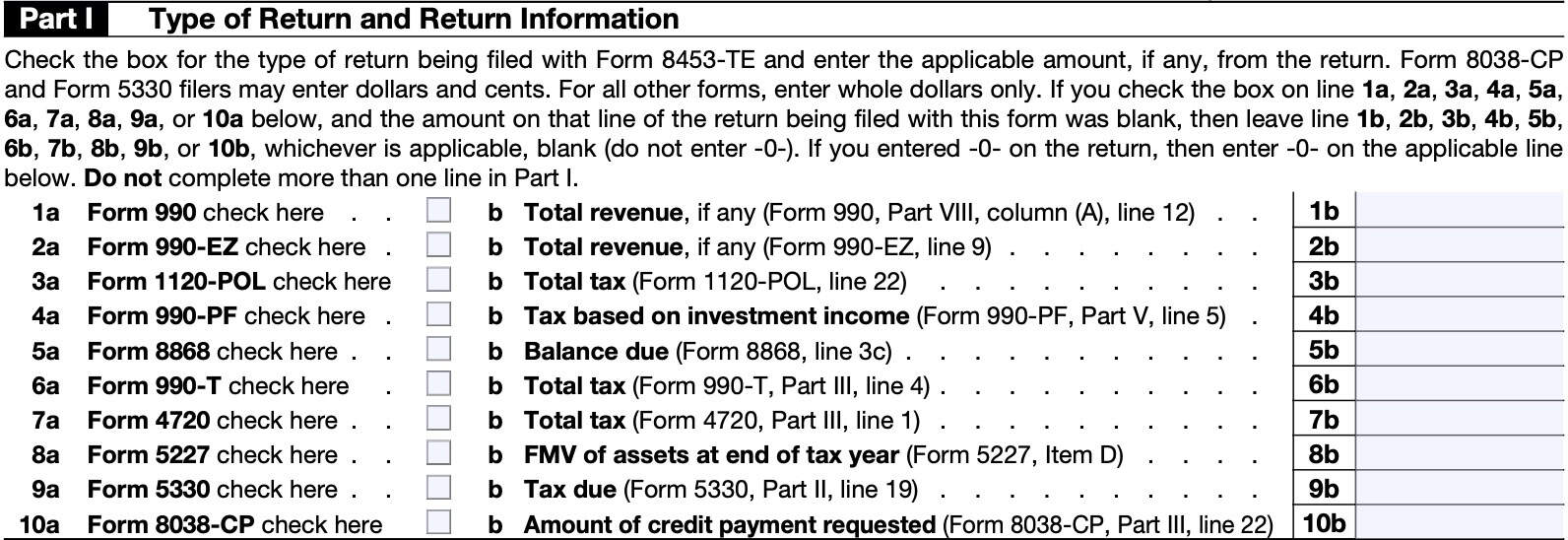
Line 7: Form 4720
Check this box if you’re filing IRS Form 4720, Return of Certain Excise Taxes Under Chapters 41 and 42 of the Internal Revenue Code.
Also, in Line 7b, enter the total tax amount from Part III, Line 1 of your Form 4720.
Line 8: Form 5227
Check this box if you’re filing IRS Form 5227, Split-Interest Trust Information Return.
Also, in Line 8b, enter the FMV of assets at the end of the tax year from Item D of your Form 5227.
Line 9: Form 5330
Check this box if you’re filing IRS Form 5330, Return of Excise Taxes Related to Employee Benefit Plans.
Also, in Line 9b, enter the tax due amount from Part II, Line 9 of your Form 5330.
Line 10: Form 8038-CP
Check this box if you’re filing IRS Form 8038-CP, Return for Credit Payments to Issuers of Qualified Bonds.
Also, in Line 10b, enter the amount of credit payment requested from Part III, Line 22 of your Form 8038-CP.
Part II: Declaration of Officer or Person Subject to Tax
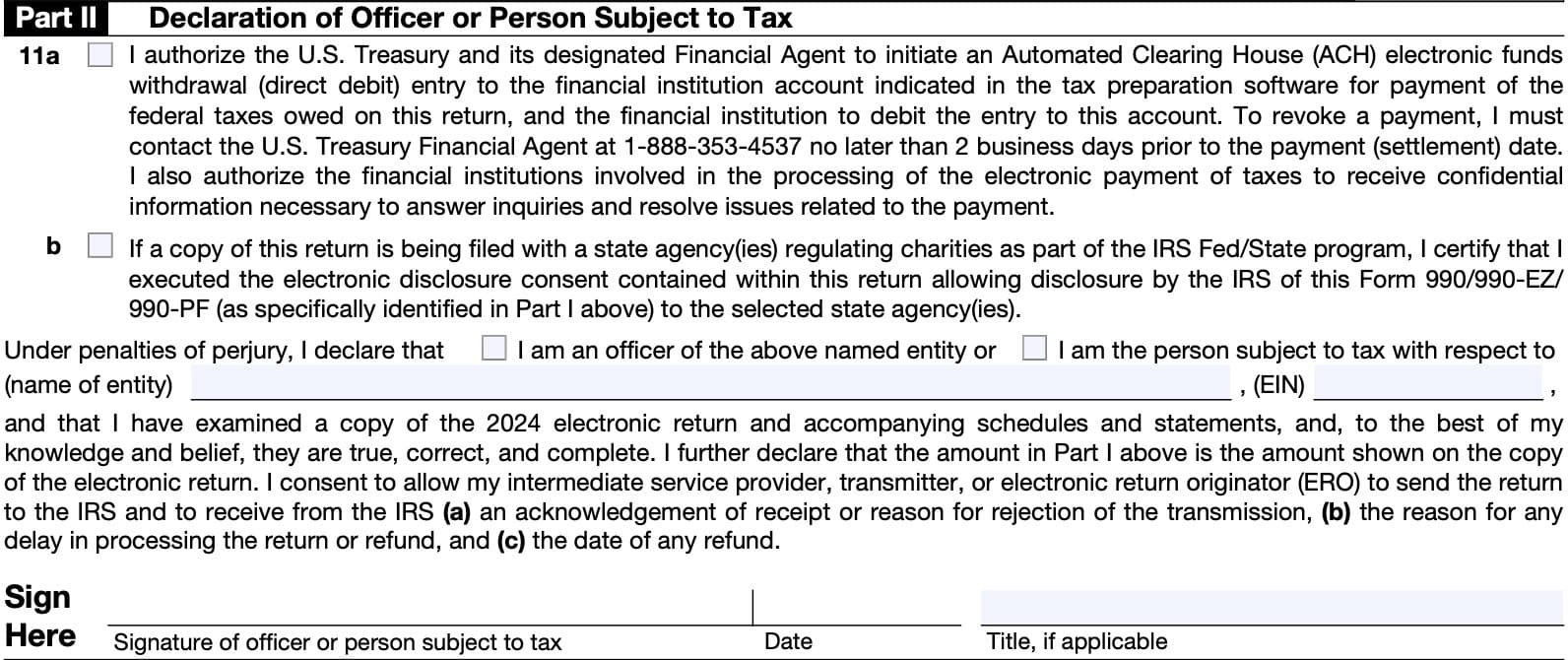
In this section, the officer or person who is subject to tax will:
- Choose whether or not to authorize debit payments from the financial institution account associated with this tax return
- Certify the execution of any electronic disclosure consents contained within this tax return so that the Internal Revenue Service may share relevant tax information with selected state agencies
- Certify that the electronic return and accompanying schedules and statements are true, correct, and complete to the best of their knowledge
Let’s take a closer look at each section.
Line 11a
If you’ve authorized payment of federal taxes owed by direct debit, then check this box. If you check this box, when filing Form 990-PF, Form 990-T, Form 1120-POL, Form 4720, Form 5330, or Form 8868 with a tax payment, then you need to ensure that the following information related to the financial institution account is also provided in the tax software:
- Routing number,
- Account number,
- Type of account
- Checking or savings
- Debit amount, and
- Debit date (date the entity or person subject to tax wants the debit to occur).
Line 11b
If you are filing a copy of this tax return with one or more state agencies that regulate charities as part of the IRS Fed/State program, then check this box.
Checking this box certifies the electronic disclosure consent, which allows the IRS to release details of the Form 990, Form 990-EZ, or Form 990-PF to the selected state agency or agencies.
Certification
In the third paragraph, check the appropriate box to declare whether you are an officer or person subject to tax (and enter the name of the entity and employer identification number (EIN)).
Sign, date, and enter your title in the space provided.
Part III: Declaration of Electronic Return Originator (ERO) and Paid Preparer
In Part III, the ERO and paid tax return preparer declare that the submitted information is complete and correct, under penalty of perjury.
Difference between the ERO and paid preparer
There is a difference between an electronic return originator (ERO) and a paid preparer.
Paid preparer
A paid tax return preparer is anyone who is paid to prepare the estate’s or trust’s tax return. A paid preparer must enter their preparer tax identification number (PTIN) in the paid preparer only portion of Part III.
To receive a PTIN, a paid preparer must complete and submit IRS Form W-12, IRS Paid Preparer Tax Identification Number Application and Renewal to the Internal Revenue Service.
Electronic return originator (ERO)
The ERO is one who deals directly with the fiduciary and either prepares tax returns or collects prepared tax returns, including Forms 8453-TE, for fiduciaries who wish to have the return of the estate or trust electronically filed. The ERO’s signature is required by the IRS.
However, the ERO is not responsible for reviewing the return. The ERO is only responsible for ensuring that the information on Form 8453-TE matches the information on the tax return itself. Additionally, the ERO will give the fiduciary a copy of all forms and information submitted to the IRS.
If also the paid preparer, then the ERO is responsible for reviewing the return. If there is a separate paid tax return preparer, he or she must sign below.
ERO’s use only:
In this section, the ERO will provide:
- Signature & date
- Check if also the paid preparer
- ERO does not need to complete the paid preparer use only section, below
- Check if self-employed
- Social Security number or preparer tax identification number (PTIN)
- Firm’s name or ERO’s name, if self-employed
- Employer identification number (EIN)
- Phone number
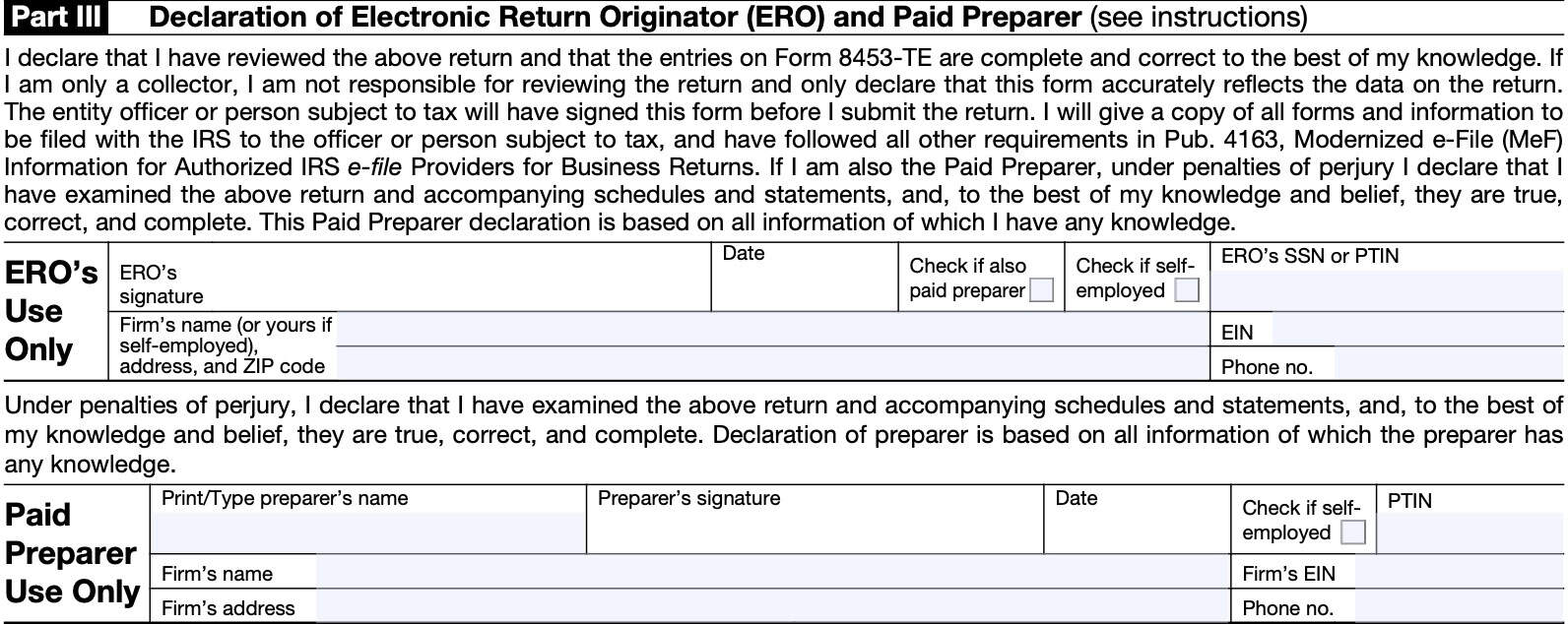
Paid preparer use only:
In this section, the paid preparer will provide:
- Name
- Signature & date
- Check if self-employed
- PTIN
- Firm’s name
- Firm’s EIN
- Address
- Phone number
Are you using the correct Form 8453?
According to the IRS website, there are 14 different versions of IRS Form 8453, including IRS Form 8453-TE. Below is a brief summary of each of the 13 other IRS forms, and what each form does.
IRS Form 8453, U.S. Individual Income Tax Transmittal for an IRS e-file Return
Individual taxpayers use IRS Form 8453 to send required paper forms or supporting documentation that cannot be submitted to the Internal Revenue Service via electronic means.
IRS Form 8453, U.S. Individual Income Tax Transmittal for an IRS e-file Return (Spanish)
Spanish version of the individual income tax transmittal tax form described above.
IRS Form 8453-CORP, U.S. Corporation Income Tax Declaration for an IRS e-file Return
U.S. corporations use IRS Form 8453-CORP to:
- Authenticate an electronic Form 1120, U.S. Corporation Income Tax Return
- Authorize the ERO, if any, to transmit via a third-party transmitter
- Authorize the ISP to transmit via a third-party transmitter if filing online (not using an ERO)
- Provide the corporation’s consent to directly deposit any refund into a bank account and/or authorize a direct debit for payment of federal taxes owed
IRS Form 8453-EG, E-file Declaration for Forms 709, 709-NA, 706, 706-A, 706-GS(D), 706-GS(T), 706-NA, and 706-QDT
Taxpayers use IRS Form 8453-EG to:
- Authenticate an electronic Form 709 and Form 709-NA;
- Authorize the ERO, if any, to transmit via a third-party transmitter;
- Authorize the intermediate service provider (ISP) to transmit via a third-party transmitter if you are filing online (not using an ERO); and
- Provide the taxpayer’s consent to authorize an electronic funds withdrawal for payment of federal taxes owed.
IRS Form 8453-EMP, Employment Tax Declaration for an IRS e-file Return
Taxpayers use IRS Form 8453-EMP to:
- Authenticate an electronic Form 940, 940-PR, 941, 941-PR,
- 941-SS, 943, 943-PR, 944, or 945,
- Authorize the ERO, if any, to transmit via a third-party transmitter
- Authorize the intermediate service provider (ISP) to transmit via a third-party transmitter if filing online without using an ERO, and
- Provide taxpayer’s consent to authorize an electronic funds transfer for payment of federal taxes owed
IRS Form 8453-EX, Excise Tax Declaration for an IRS e-file Return
Taxpayers use IRS Form 8453-EX to:
- Authenticate electronic versions of the following forms:
- IRS Form 720
- IRS Form 2290
- IRS Form 8849
- Authorize the ERO, if any, to transmit via a third-party transmitter
- Authorize the ISP to transmit via a third-party transmitter if filing online without an ERO
- Provide taxpayer’s consent for electronic funds withdrawal to pay taxes owed
IRS Form 8453-FE, Estate/Trust Declaration for IRS e-file Return
Taxpayers use IRS Form 8453-FE to:
- Authenticate the electronic Form 1041, U.S. Income Tax Return for Estates and Trusts;
- Authorize the electronic filer to transmit via a third-party transmitter; and
- Authorize an electronic funds withdrawal for payment of federal taxes owed.
IRS Form 8453-PE, U.S. Partnership Declaration for an IRS e-file Return
Partnerships use IRS Form 8453-PE to:
- Authenticate an electronic Form 1065, U.S. Return of Partnership Income, as part of return or administrative adjustment request (AAR)
- Authorize the ERO, if any, to transmit via a third-party transmitter
- Authorize the ISP to transmit via a third-party transmitter if filing online (not using an ERO).
IRS Form 8453-R Declaration and Signature for Electronic Filing of Form 8963
Taxpayers used IRS Form 8453-R to authenticate the electronic filing of Forms 8963, Report of Health Insurance Provider Information.
IRS Form 8453-S, U.S. S Corporation Income Tax Declaration for an IRS e-file Return
Prior to tax year 2022, U.S. S-corporations used this tax form to:
- Authenticate an electronic Form 1120-S, U.S. Income Tax Return for an S-Corporation
- Authorize the ERO, if any, to transmit via a third-party transmitter
- Authorize the ISP to transmit via a third-party transmitter if filing online (not using an ERO)
- Provide the corporation’s consent to directly deposit any refund into a bank account and/or authorize a direct debit for payment of federal taxes owed
IRS Form 8453-TR, E-file Declaration or Authorization for Form 1045/1139
Taxpayers use IRS Form 8453-TR to:
- Authenticate (declare) an electronic copy of:
- Authorize the ERO to electronically transmit an application for tentative refund; and
- Provide the taxpayer’s consent to directly deposit any refund.
IRS Form 8453-WH, Electronic Filing Declaration for Form 1042
Taxpayers use IRS Form 8453-WH to:
- Authenticate an electronic Form 1042, Annual Withholding Tax Return for U.S. Source Income of Foreign Persons;
- Provide consent to authorize an electronic funds withdrawal for tax payments of the balance due on IRS Form 1042
- Authorize the intermediate service provider (ISP) to transmit via a third-party transmitter if you are filing online (not using an ERO); and
- Authorize the ERO, if any, to transmit via a third-party transmitter
IRS Form 8453-X, Political Organization Declaration for Electronic Filing of Notice of Section 527 Status
After electronically submitting IRS Form 8871, Political Organization Notice of Section 527 Status, an authorized official must sign, date, and send IRS Form 8453-X to the Internal Revenue Service. This allows the political organization to:
- File an amended or final Form 8871, or
- To electronically file Form 8872, Political Organization Report of Contributions and Expenditures.
Video walkthrough

Frequently asked questions
Taxpayers use IRS Form 8453-TE to accompany a tax-exempt organization’s electronically filed income tax return, when filed by an intermediate service provider (ISP) or electronic return originator (ERO). Taxpayers also use this form to authorize electronic funds transfer for tax payments or refunds.
IRS Form 8453-TE is used to submit an electronic tax-exempt tax return through an intermediate service provider (ISP) without using an electronic return originator (ERO). IRS Form 8879-TE allows the ERO to sign the return with an identity protection PIN number (IP PIN). An ERO may use either form.
Where can I find IRS Form 8453-TE?
You can find IRS forms, such as IRS Form 8453-TE, on the Internal Revenue Service website. For your convenience, we’ve attached the latest version of this tax form here, in this article.