IRS Form 656 Instructions
An offer in compromise, submitted on IRS Form 656, allows you to settle your tax debt for less than the full amount you owe. It may be a legitimate option if you can’t pay your full tax liability or doing so creates a financial hardship.
In this article, we’ll go over everything you need to know about IRS Form 656, including:
- How to complete and submit IRS Form 656
- Documentation requirements for submitting an offer in compromise
- Frequently asked questions and filing considerations
First, let’s go over how to complete this form, step by step.
Contents
Table of contents
How do I complete IRS Form 656?
IRS Form 656, Offer In Compromise, is not a stand-alone document. The Internal Revenue Service (IRS) requires most taxpayers to file IRS Form 656 in conjunction with one of the following information statements:
- IRS Form 433-A, Collection Information Statement for Wage Earners and Self-Employed Individuals, or
- IRS Form 433-B, Collection Information Statement for Businesses
For more information on how to submit the offer in compromise, please go to Filing Considerations, in the next section.
There are 9 sections to complete in IRS Form 656, but taxpayers may not use all of them:
- Section 1: Individual Taxpayers (Form 1040 Filers)
- Section 2: Business Information (Form 1120, 1065, etc., filers)
- Section 3: Reason for Offer
- Section 4: Payment terms
- Section 5: Designation of Payment and Electronic Federal Tax Payment System (EFTPS)
- Section 6: Source of Funds, Making Your Payment, Filing Requirements, and Tax Payment Requirements
- Section 7: Offer Terms
- Section 8: Signatures
- Section 9: Paid Preparer Use Only
Let’s begin at the top of the form with step by step instructions.
Top of the form
At the very top of Form 656, you’ll see the following question:
Did you use the Pre-Qualifier tool or the Individual Online Account eligibility check prior to filling out this form?
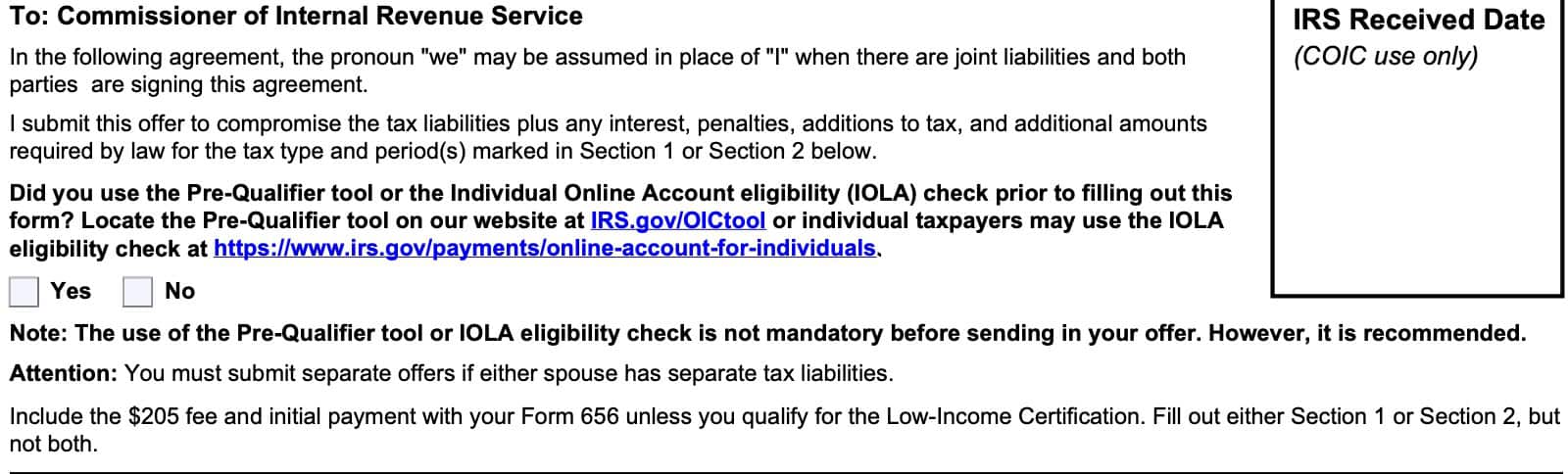
Check Yes or No.
What is the IRS Pre-qualifier tool?
To help taxpayers better understand their payment options, the IRS created the Offer In Compromise Pre-Qualifier tool. This tool allows anyone to enter information about their particular tax situation into an online calculator so they can understand their payment options under the Offer In Compromise program.
You can use this tool as many times as you wish, until you are able to determine a tax payment amount that the IRS will accept. Once you’ve determined the amount of tax that you need to pay, you should be able to use this information to complete your Offer In Compromise booklet.
You do not have to use the pre-qualifier tool, but doing so may save you a lot of time, money, and effort.

At the top of IRS Form 656, there are a couple of other things you should note:
- If either spouse has separate tax liabilities, then both spouses must complete Form 656 separately.
- You must include a $205 processing fee and your initial tax payment unless you qualify for Low-Income Certification, below.
- You will need to complete either of the following, but not both:
Proceed to the applicable section.
Section 1: Individual Information (Form 1040 filers)
Complete Section 1 if you are an individual taxpayer, facing any of the following tax situations:
- Income tax, reported on IRS Form 1040, U.S. Individual Income Tax Return (or Form 1040-SR, or taxpayers age 65 or older)
- Personal liability for excise tax
- Trust fund recovery penalty
- Self-employment taxes
- Personal responsibility for partnership liabilities
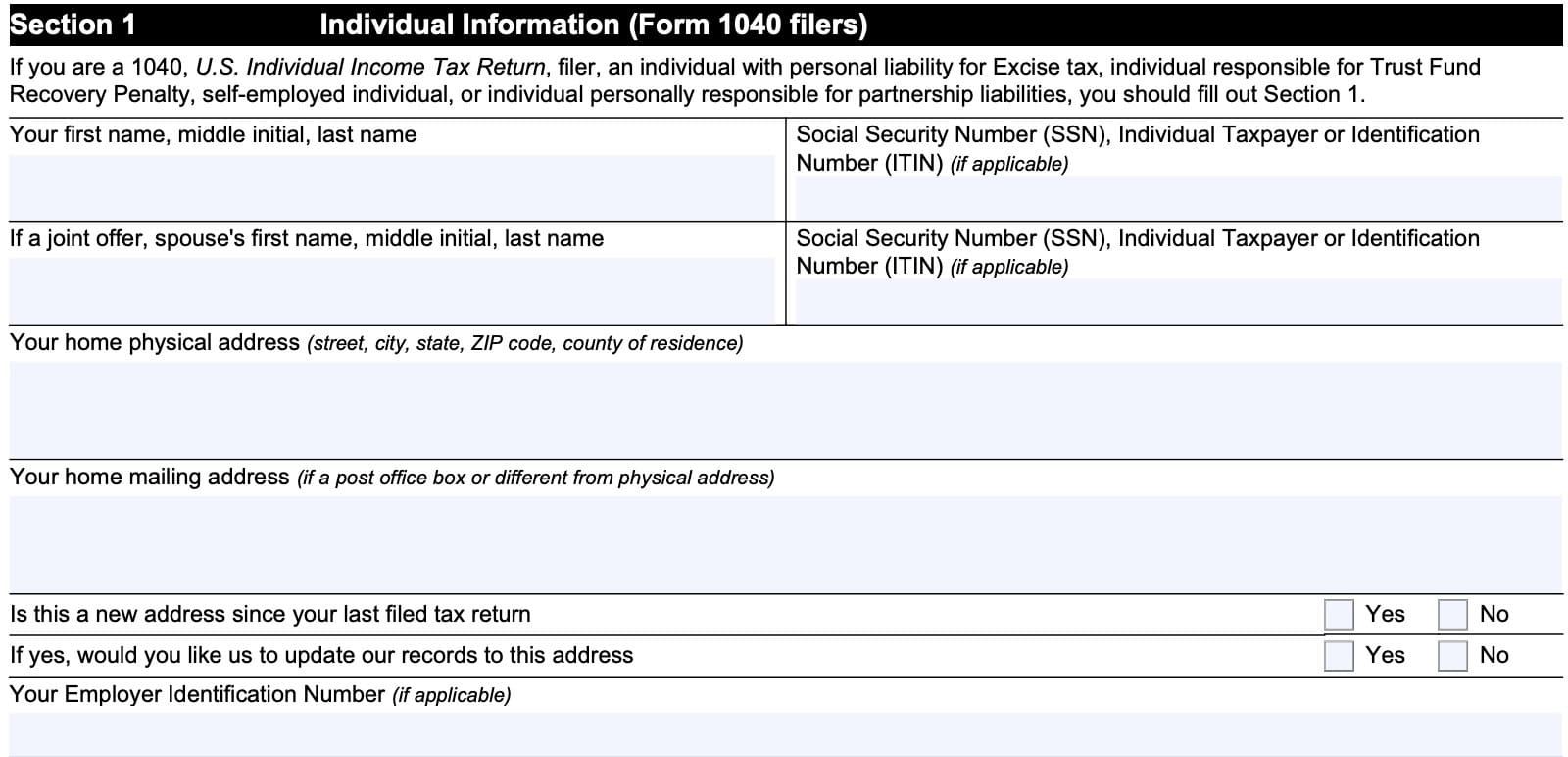
Taxpayer name and tax ID number
Enter your complete name in the space provided, including:
- First name
- Middle initial
- Last name
Also, enter your Social Security number or individual taxpayer identification number (ITIN), as applicable, in the appropriate space.
Spouse name and tax ID number
For married couples filing a joint return, complete the spouse name and tax identification number fields also.
Home physical address
Enter your complete address information in this field, including:
- Street name and number
- City, state, and zip code
If you have recently moved, you may consider updating your tax records to reflect the correct address. This automatically happens when you file your next annual tax return, but you can also do this by filing IRS Form 8822, Change of Address.
Home mailing address
If you have a post office box, or if your mailing address is different from the address that you previously listed, enter the mailing address in this field.
Employer identification number
If applicable, enter your employer identification number, or EIN, in this space. If you do not have an EIN, skip this part.
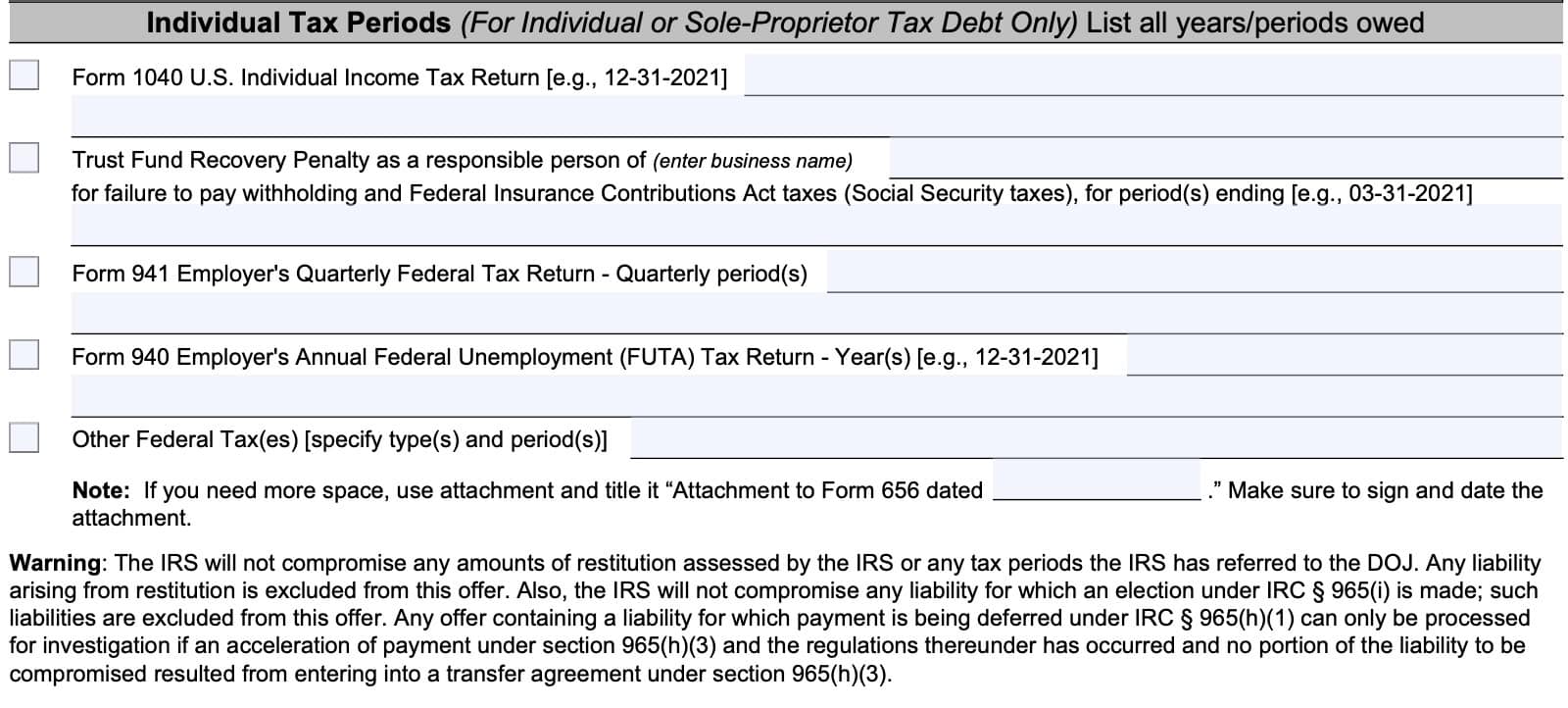
Individual tax periods
In this section, you will list all tax periods or years, that you owe taxes for. Let’s take a closer look at each field.
Form 1040 U.S. Individual Income Tax Return
If your offer in compromise covers your annual tax return, then you would enter all of the years for which you owe back taxes. This section includes the following Form 1040 forms:
- IRS Form 1040, U.S. Individual Income Tax Return
- IRS Form 1040-SR, U.S. Income Tax Return for Seniors
- IRS Form 1040-NR, U.S. Nonresident Alien Income Tax Return
Trust Fund Recovery Penalty
This penalty applies to businesses who did not withhold and pay Federal Insurance Contributions Act (FICA) taxes, otherwise known as Social Security and Medicare taxes.
If applicable, enter the business name and all applicable periods in the space provided.
Form 941 Employer’s Quarterly Federal Tax Return
If you did not pay your business’ quarterly federal tax return, reported on IRS Form 941, list all quarterly period(s) in the space provided.
Form 940 Employer’s Annual Federal Unemployment (FUTA) Tax Return
If you owe back taxes based on the employer’s annual federal unemployment tax return, reported on IRS Form 940, enter all applicable periods here.
Other Federal Taxes
For all other taxes, annotate the type and periods for which you owe.
If you need more space, you can attach a document with additional information. Be sure to title the document “Attachment to Form 656 dated _______.” Sign and date the attachment.
Low-Income Certification
If your adjusted gross income, or AGI, is low enough, you may be able to qualify for the low-income certification. Taxpayers who qualify for the low-income certification do not have to submit a payment with their submitted offer.
Taxpayers qualify based upon either of the following figures being below the low-income certification threshold:
- Adjusted gross income (AGI), as determined by the most recently filed individual income tax return
- Gross monthly income from IRS Form 433-A, Collection Information Statement for Wage Earners and Self-Employed Individuals, multiplied by 12
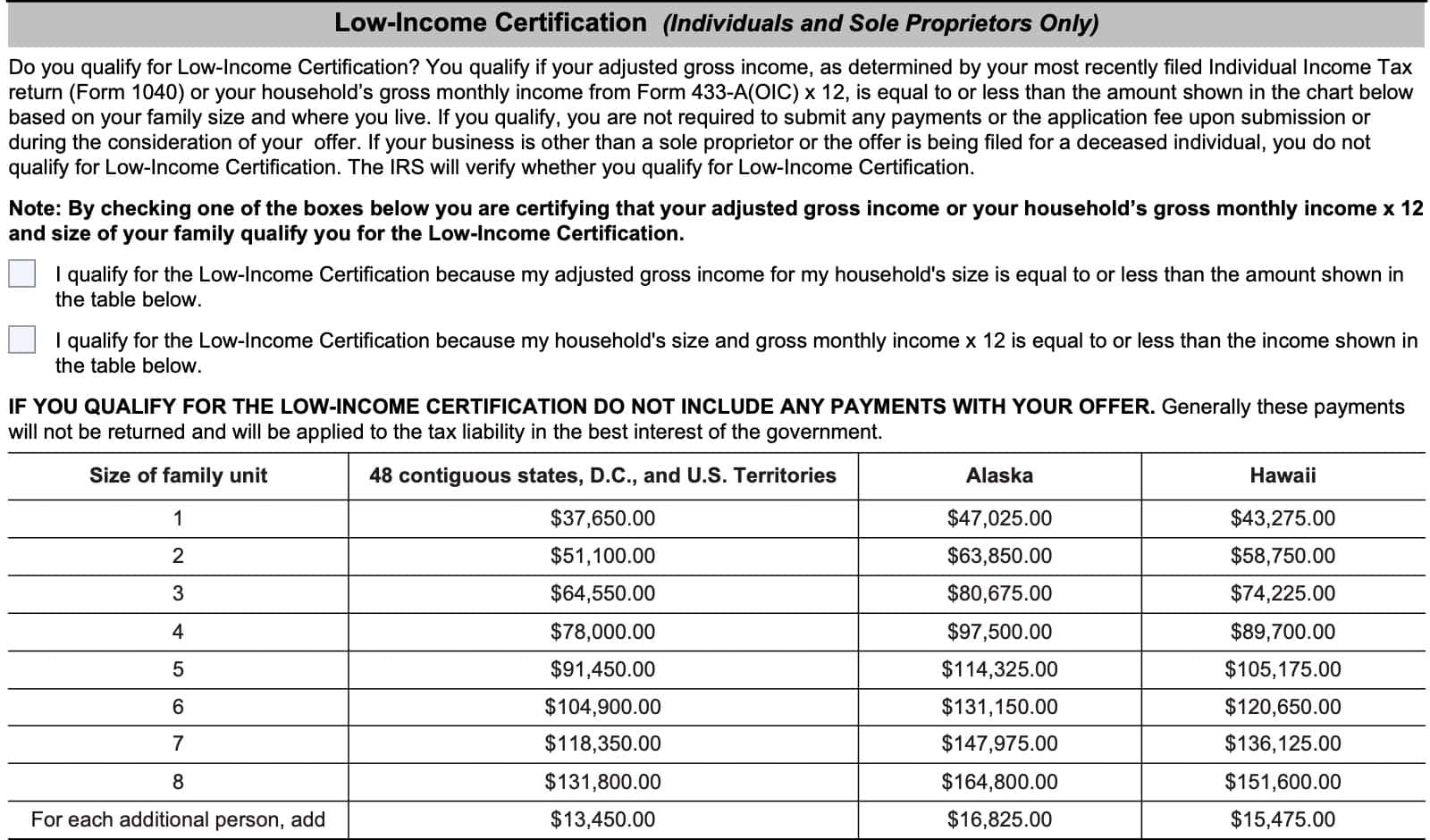
Simply review the low-income certification guidelines, as outlined below, then check the appropriate box:
- I qualify for the low-income certification because my adjusted gross income for my household’s size is equal to or less than the amount shown in the table below
- I qualify for the low-income certification because my household’s size and gross monthly income X 12 is equal to or less than the income shown in the table below
Remember, if you select either of the low-income certification criteria, you do not have to submit payment. In fact, if you do submit a payment, it will go directly towards your tax liability, and the IRS will not return it to you.
Section 2: Business information (Form 1120, 1065, etc. filers)
You must complete Section 2 if your business is any of the following:
- Corporation
- Partnership
- Limited liability company (LLC)
- Limited liability partnership (LLP)
Also, include the following:
- Initial OIC payment
- $205 application fee
- IRS Form 433-B, Collection Information Statement for Businesses
At the top of Section 2, you’ll need to complete the following information fields:
- Business name
- Business physical address
- Mailing address
- Employer identification number (EIN)
- Primary contact’s name and title
- Telephone number
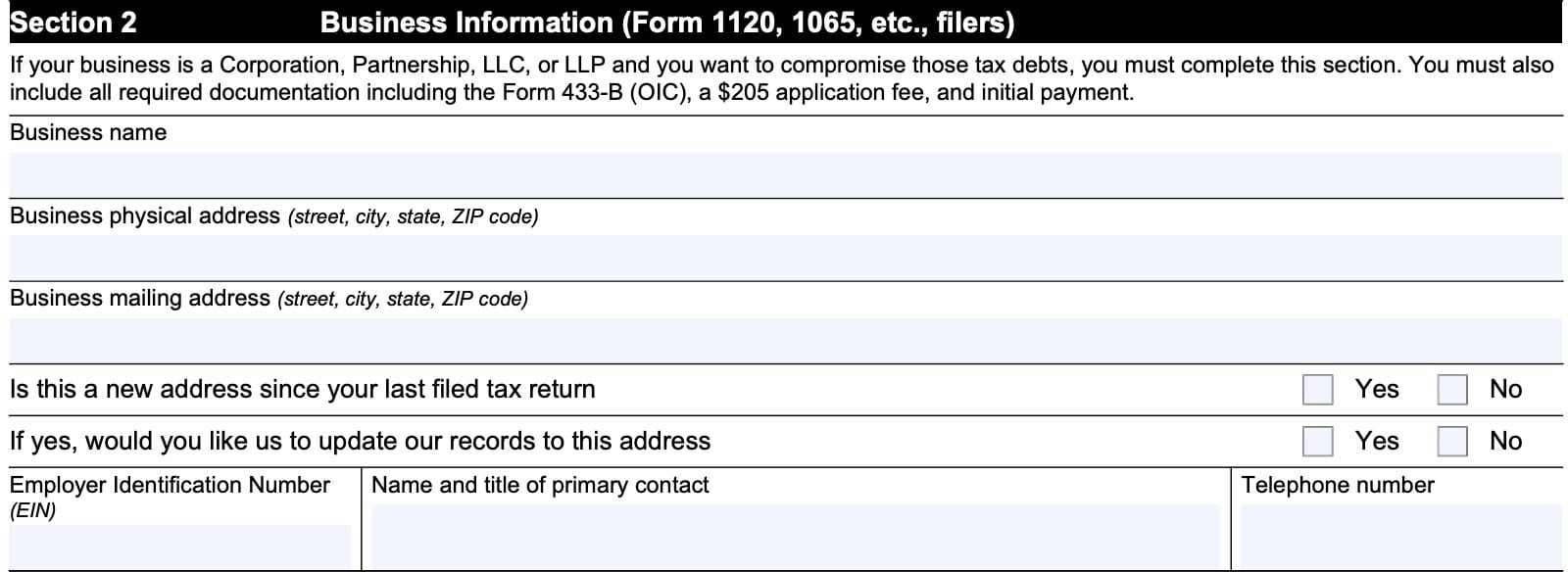
Also, you’ll need to annotate whether this is a new address since your most recent tax return, and whether you want the Internal Revenue Service to update their records with the listed business address.
Business Tax Periods
If your offer in compromise is for business tax debt only, then list all the years & periods for which you owe taxes:
- IRS Form 1120, U.S. Corporate Income Tax Return
- IRS Form 941, Employer’s Quarterly Federal Tax Return
- IRS Form 940, Employer’s Annual Federal Unemployment (FUTA) Tax Return
- Other federal taxes
- Specify the type of tax, and applicable period(s)
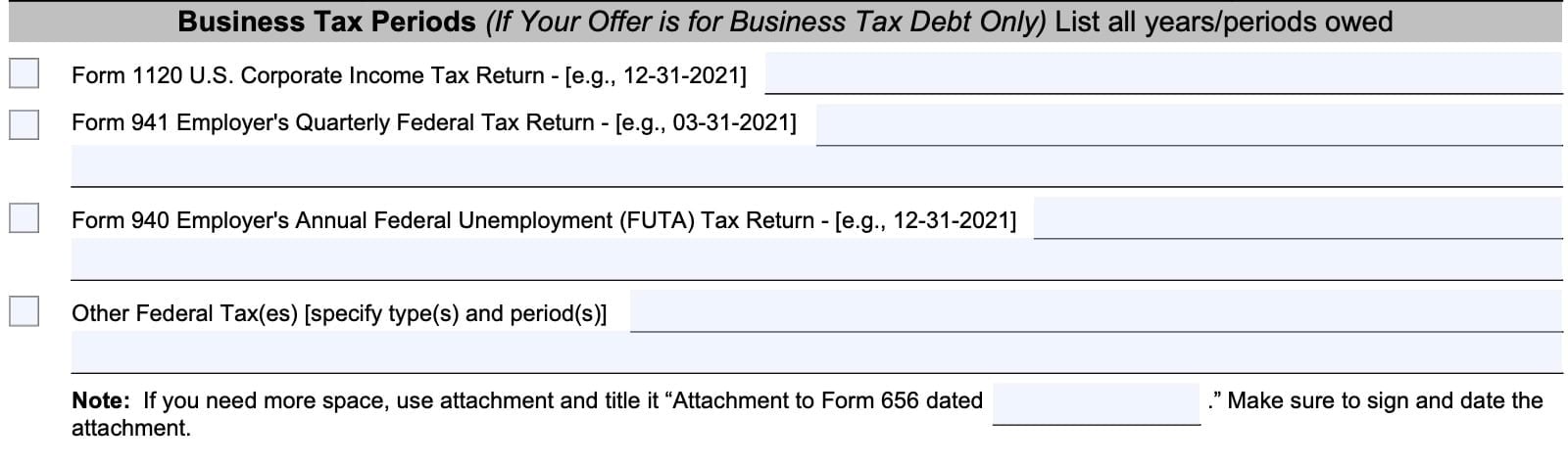
If you require more space, use an attachment, and title the document “Attachment to Form 656 dated XXXX.” Sign and date the attachment.
Section 3: Reason for offer
In Section 3, you’ll select one of the three available reasons why you’re submitting an offer-in-compromise. Let’s review each of them.
Doubt as to collectibility
Selecting this box indicates that you do not have enough in assets and income to pay your complete tax liability, and that you are offering the minimum offer amount as calculated on your collection information statement.
Effective Tax Administration – Economic Hardship
Only individual taxpayers may select this option. According to the Internal Revenue Manual, this means that a taxpayer may have enough in assets and income to pay the complete tax liability, but special circumstances mean that making the full tax payment would cause an economic hardship.
Economic hardship
The IRS goes on to explain that an economic hardship is determined on a case-by-case basis. Here are some of the factors that go into an economic hardship determination:
- The taxpayer’s age and employment status,
- Number, age, and health of the taxpayer’s dependents,
- Cost of living in the area the taxpayer resides, and
- Any extraordinary circumstances such as special education expenses, a medical catastrophe, or natural disaster.
Additionally, below are additional factors that may support an economic hardship determination:
- The taxpayer is incapable of earning a living because of a long term illness, medical condition or disability, and it is reasonably foreseeable that the financial resources will be exhausted providing for care and support during the course of the condition.
- The taxpayer may have a set monthly income and no other means of support and the income is exhausted each month in providing for the care of dependents.
- The taxpayer has assets, but is unable to borrow against the equity in those assets, and liquidation to pay the outstanding tax liabilities would render the taxpayer unable to meet basic living expenses.
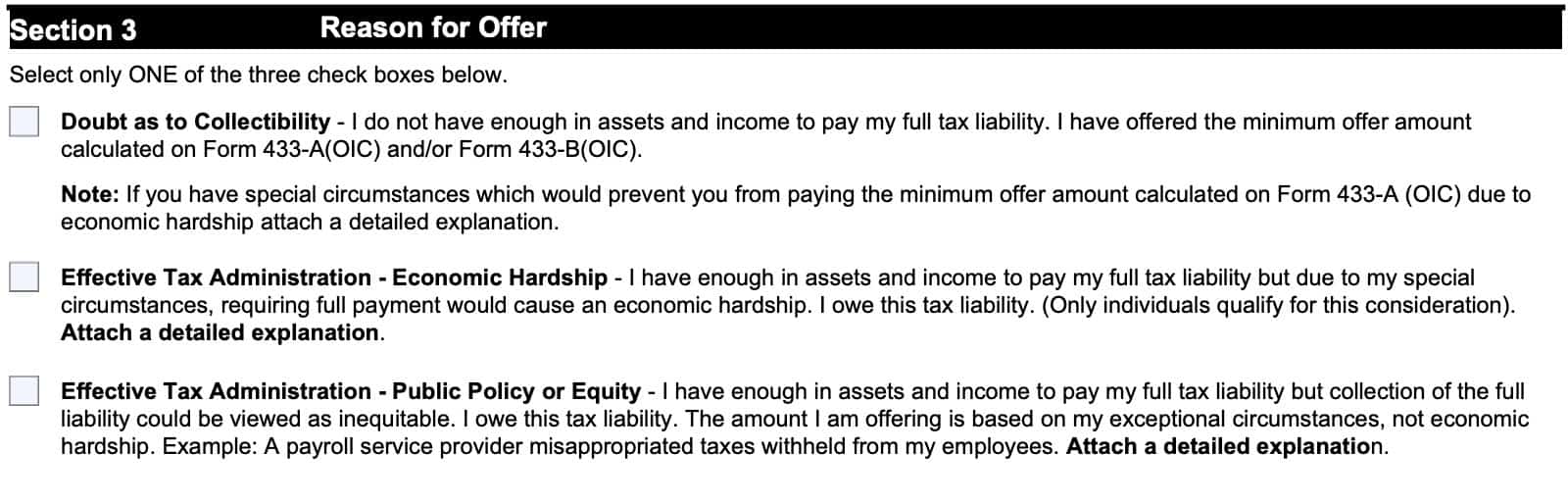
Effective Tax Administration – Public Policy or Equity
Selecting this option indicates that the taxpayer has enough assets and income to pay the complete tax liability, but collecting the full amount would be viewed as inequitable. The offer-in-compromise is being submitted due to exceptional circumstances, not economic hardship.
Public Policy or Equity
The Internal Revenue Manual goes into detail to explain the conditions for which the IRS will accept an OIC offer for public policy or equity reasons. At a minimum, an acceptable offer would meet the following conditions:
- The taxpayer has remained in compliance since incurring the liability and overall their compliance history does not weigh against compromise;
- Note: A taxpayer is deemed to meet the compliance requirement, if they incurred a related liability caused by the fraudulent acts of a payroll service provider (PSP).
- The taxpayer must have acted reasonably and responsibly in the situation giving rise to the liabilities; and
- An OIC acceptance should not place the taxpayer in a better position than they would occupy if they had timely and fully met their obligations, unless special circumstances exist to justify the compromise.
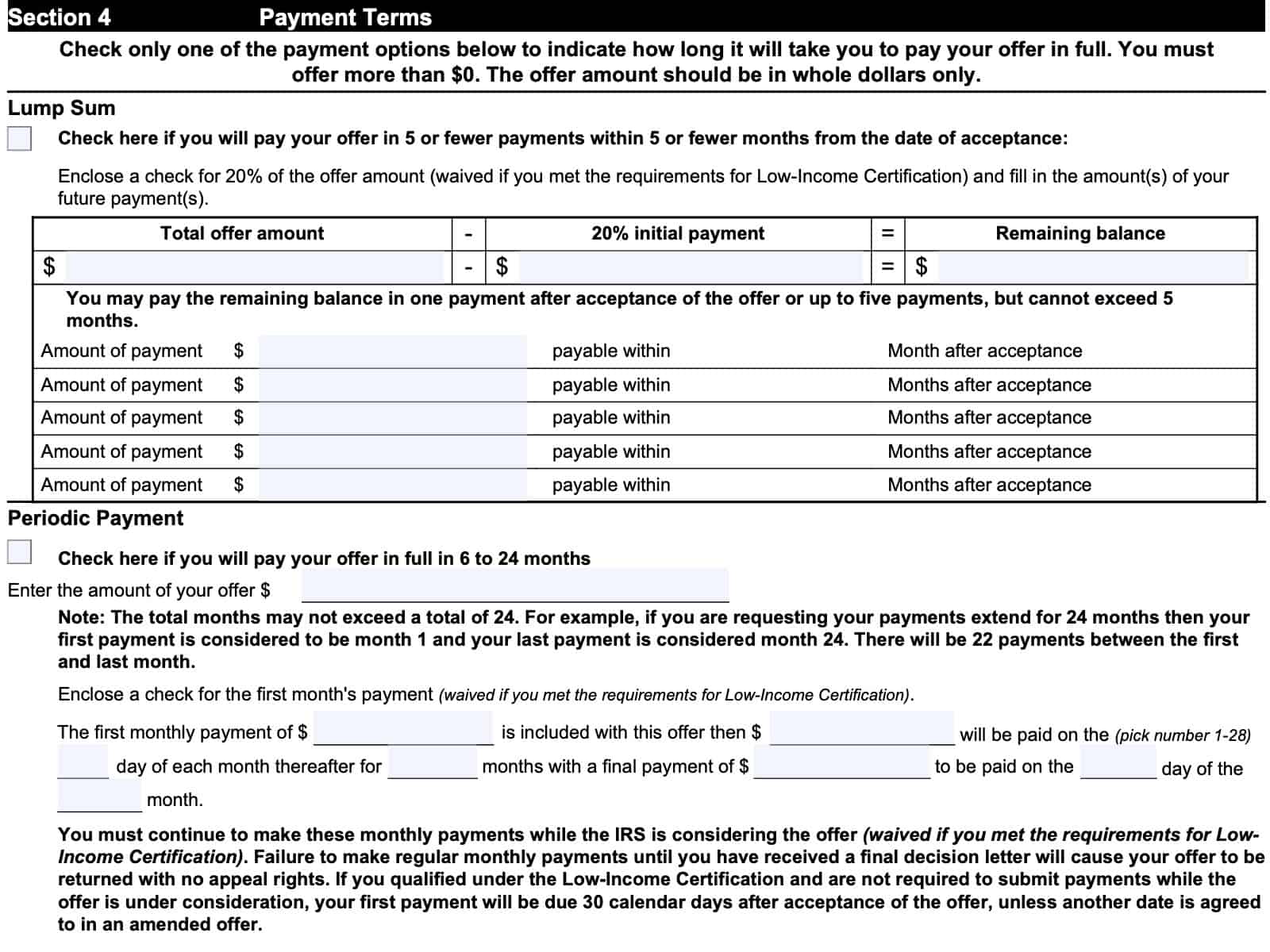
Section 4: Payment terms
In Section 4, you’ll determine the payment terms. You can select either of the following choices:
- Lump sum: Choose this if you will pay your complete offer in 5 or fewer payments within 5 or fewer months of the date of acceptance
- Periodic payment: Select this option if you will pay your offer in full within 6 to 24 months
You should only check one payment option, based on how long it will take you to pay your offer in full.
Let’s take a closer look at each option.
Lump sum
The lump sum payment option may provide for a lower total payment in exchange for paying the total offer down more quickly. However, you must submit a check for 20% of the offer amount, and complete the amount(s) of your future payments, in accordance with the stipulated terms:
- 5 or fewer payments
- Within 5 or fewer months of acceptance
Taxpayers who meet the requirements for Low-Income Certification may not need to submit an initial payment. However, if you do submit a payment, the IRS will apply it to your outstanding tax amount, and you should not expect to receive a refund, even if your offer is rejected.
If you select the lump sum payment method, then enter the following information:
- Total offer amount
- 20% initial payment amount
- Remaining balance
- Can be divided into as many as 5 payments after acceptance, within 5 months
Periodic payment
The periodic payment option allows for a longer payment period, for up to 24 months. However, the IRS will probably expect a higher payoff amount because you’re paying your tax liability over a longer period of time than you would with the lump sum method.
To select the periodic payment,
- Check the applicable box
- Enter the total offer amount
- Enclose a check for the first month’s payment
- This requirement is waived if you meet the low-income certification criteria
- Enter the following amounts as indicated:
- First payment amount
- Monthly payment amounts
- Expected payment date (day of the month)
- Number of months (not to exceed 24)
- Final payment date and amount
If you meet the low-income certification requirements, your first payment will be due 30 calendar days after the offer acceptance. Keep in mind, the 30-day clock begins on the date indicated on a written acceptance letter, not the date that you receive the letter.
Section 5: Designation of Payment and Electronic Federal Tax Payment System (EFTPS)
In Section 5, you’ll complete the payment designation information. For simplicity, we’ve broken this down into two parts:
- Designation of Payment
- EFTPS or IOLA
Let’s take a closer look.
Designation of Payment
Here, you’ll simply indicate if you would like the Internal Revenue Service to apply your tax payment to a specific tax year or a tax debt. If so, indicate the tax period or quarter that you would like to apply your payment to.
If you do not designate a specific destination, then the IRS will select how to apply your payment.
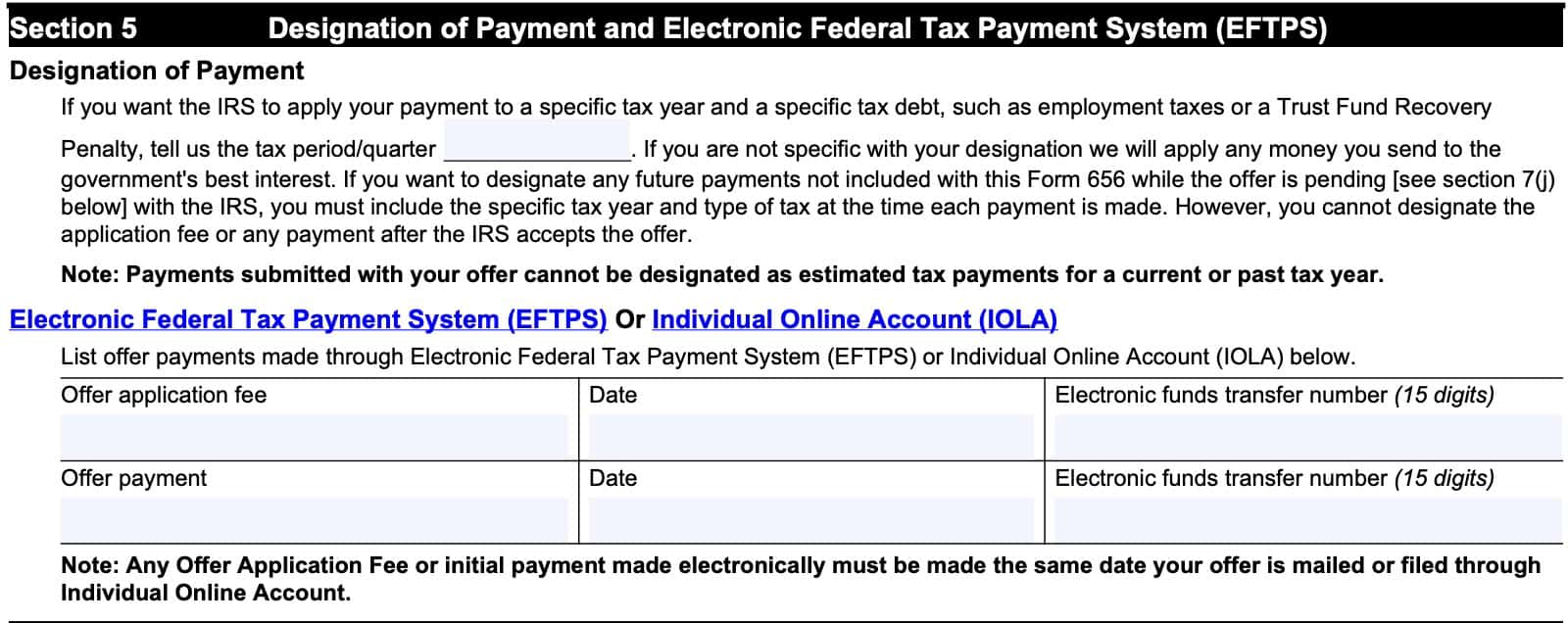
EFTPS or IOLA
You can list your offer payment made through either the electronic federal tax payment system (EFTPS), or your individual online account.
If you have made your payment, indicate the following below:
- Offer application fee amount, date, and electronic funds transfer (EFT) number
- Offer payment amount, date, and EFT number
Let’s take a closer look at each option.
Electronic federal tax payment system (EFTPS)
As of October 17, 2025, individual taxpayers are no longer allowed to create an EFTPS account to make a tax payment. If you created your EFTPS account prior to October 17, 2025, you may use your existing account to make your payment.
Otherwise, individual taxpayers must create and use an individual online account to make their offer payment.
Individual online account (IOLA)
If you have created an online IRS account, then you should be able to post the offer payment details that you made from your account.
Below are two YouTube tutorial videos on how to:
- Make your IRS online payment through your IOLA
- Check a payment that you previously made online
Make your IRS online payment through your IOLA

Check a payment that you previously made online

Section 6: Source of Funds, Making Your Payment, Filing Requirements, and Tax Payment Requirements
This section contains the information regarding:
- Where your payments will come from
- How you plan to make your payments
- Verification that you have met the filing and tax payment requirements
Source of funds
In this section, indicate where you will obtain the funds to pay your offer.
Making your payment
Include separate checks for the payment and application fee. This only applies to offers filed by paper form. If this applies, then do the following:
- Make checks payable to United States Treasury
- Attach checks to the front of your Form 656
- Ensure your checks are in U.S. dollars only
- Send a separate application fee with each offer; do not combine application fees with other tax payments
You may also make payments electronically through Electronic Federal Tax Payment System (EFTPS).
Individual taxpayers may also make OIC payments via Individual Online Account. Your offer will be returned to you if:
- Your application fee and required payment are not included, or
- Your check is returned for insufficient funds
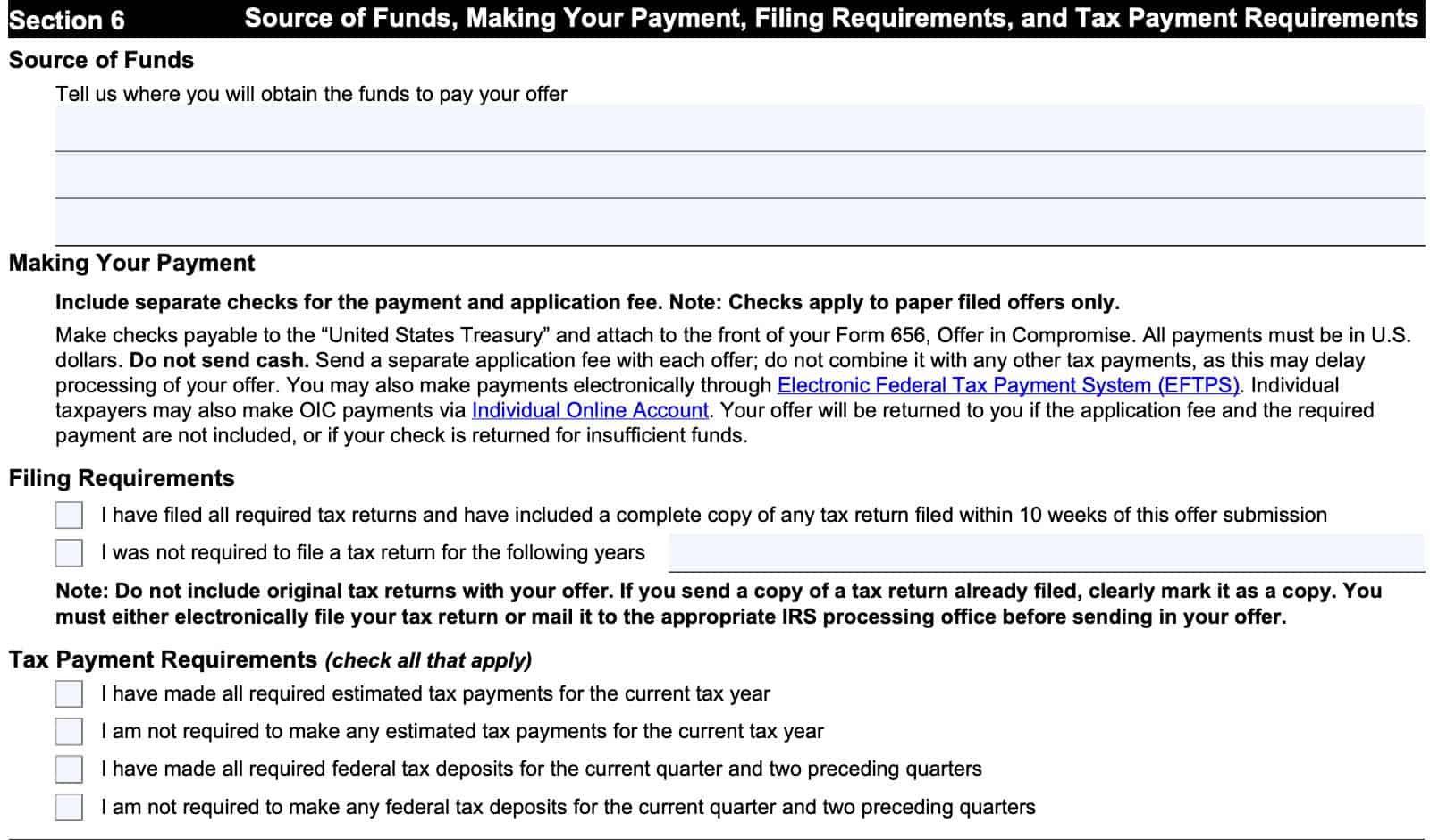
Filing requirements
There are two boxes here. Check the appropriate box:
- I have filed all required tax returns and have included a complete copy of any tax return filed within 10 weeks of this offer submission
- I was not required to file a tax return for specific tax years
- Be sure to specify which tax years
If you are sending copies of tax returns previously filed, then clearly mark it as a copy.
Tax payment requirements
Check all of the applicable boxes:
- I have made all required estimated tax payments for the current tax year
- I am not required to make any estimated tax payments for the current year
- I have made all required federal tax deposits for the current quarter and two preceding quarters
- I am not required to make any for the current quarter and two preceding quarters
Section 7: Offer terms
Section 7 contains the Internal Revenue Service’s terms and conditions. While there are no information fields to complete, it is important to understand what these terms and conditions are.
Let’s break them down, step by step.
Terms, Conditions, and Legal Agreement
This means that you are requesting that the IRS accept your offer amount as a payment of outstanding tax debt under federal law. This includes any interest, penalties, and other amounts required by law, as of the date on the form.
Also, if you failed to list any assessed tax debt, or any tax debt that the IRS assesses before accepting the offer, then you authorize the IRS to amend either Section 1 or Section 2 accordingly.
If you submit a joint offer, then both signers grant approval for the IRS to disclose any separate liabilities that either spouse might owe.
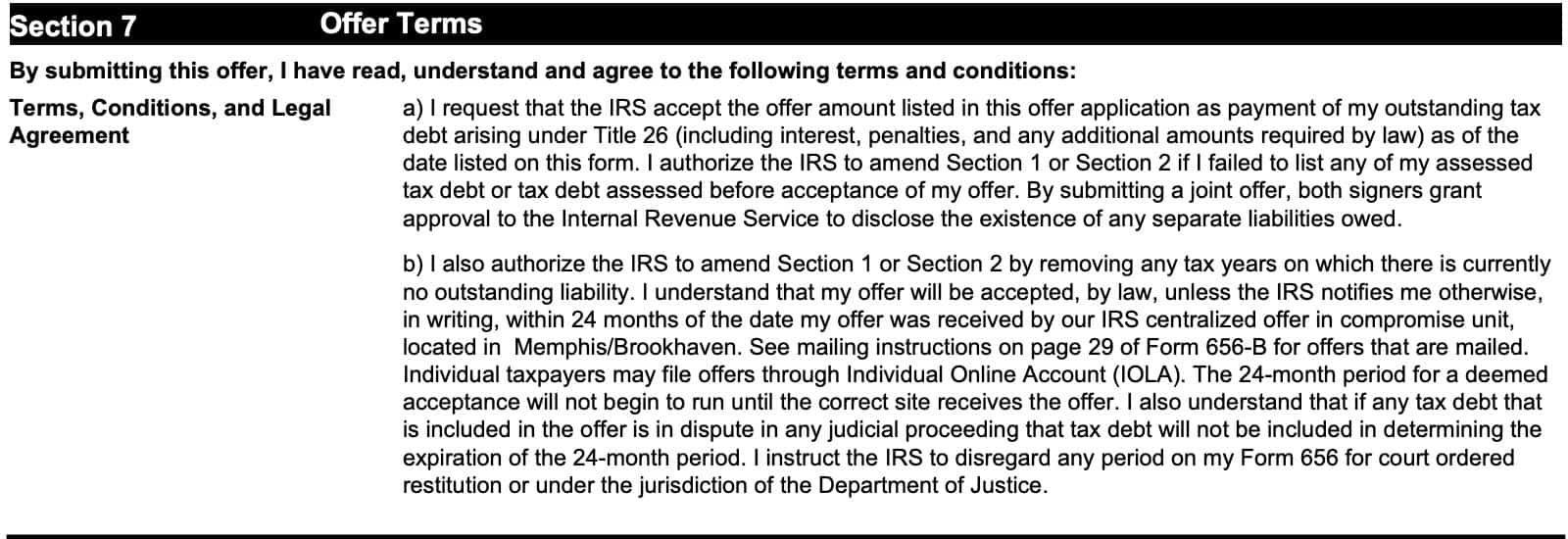
Also, the IRS can remove any tax years for which you do not have an outstanding tax liability. The IRS will accept your offer within 24 months of the date that your offer was physically received by the IRS centralized offer in compromise unit.
If physically filed, refer to the mailing instructions on page 29 of the Form 656-B booklet. The 24 month period does not begin until received at the correct IRS location. Finally, the IRS will disregard any period for court-ordered restitution or any period under Department of Justice jurisdiction.
IRS will keep my payments, fees, and some refunds
In this section, you acknowledge the following:
- All payments made on this offer and will not be returned even if the offer is withdrawn, or if the IRS rejects or returns the offer
- The IRS will apply any tax payments in the best interest of the government
- The federal government will keep the application fee unless the offer is not accepted
Low-income certification
If you checked the low-income certification in Section 1, then you do not need to submit a payment with your offer.
If you qualify for low-income certification and send a payment, then all money will be applied to your tax debt, even if your offer is not accepted. You will not receive this money back.
Treasury Regulations
According to Treasury Regulations Section 301.7122(e)(5),
- You cannot file an amended tax return for any years listed on Form 656
- After the offer has been accepted
- After you have submitted your offer, and while the offer remains pending
- Filing an amended return under these conditions can terminate an accepted offer
- Any refunds related to an amended return filed for a tax year with an ending date prior to acceptance will be subject to a tax refund offset.
- If you receive a refund prior to offer acceptance, or based on an amended tax return for any tax periods extending to the acceptance date, then you have 30 days to return the refund to the IRS
- Although a refund may be offset to the tax liability while an offer is pending, there may be assistance available for taxpayers (non businesses) facing an economic hardship
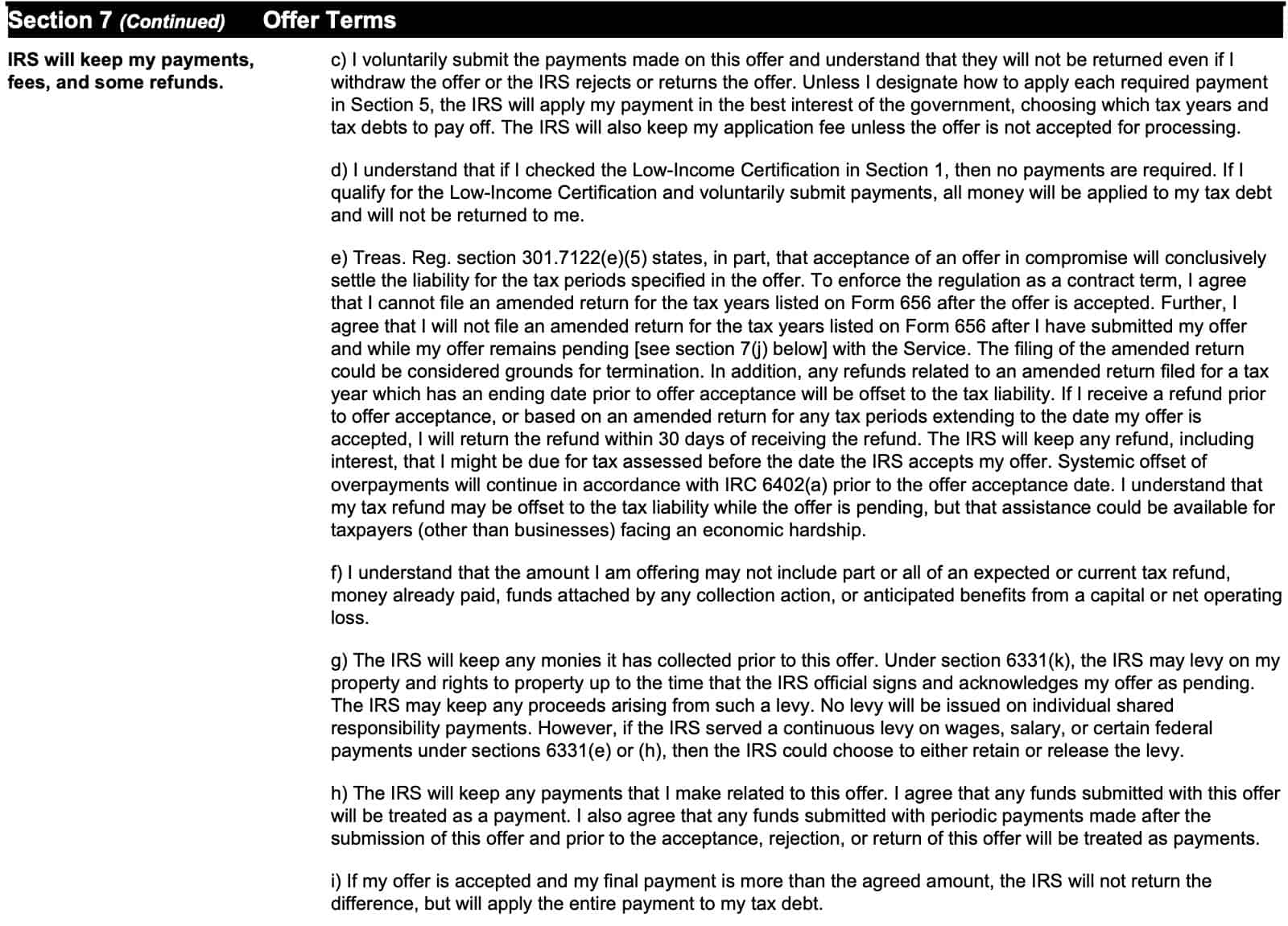
Also, you accept that:
- Any offered amounts may not include part or all of:
- An expected or current tax refund
- Money already paid
- Funds attached by collection action
- Anticipated benefits from a capital or net operating loss
Collections prior to acceptance
The IRS will also keep any money that it has collected prior to an accepted offer.
Under Internal Revenue Code Section 6331(k), the IRS cannot levy any property while an offer has been accepted, or is considered pending. However, the IRS does retain the right to levy property up to the point that an IRS official signs and acknowledges the offer as pending, and will keep any proceeds from such a levy.
Furthermore, if the IRS served a continuous levy on wages, salary, or certain government payments, then the IRS can either retain or release the levy.
If your offer is accepted, and the final payment is more than the agreed amount, the IRS will not return the difference. Rather, the IRS will apply the difference to your outstanding tax debt.
Pending status of an offer and right to appeal
Once an authorized IRS official signs the form, your offer is considered pending as of the signature date. Your offer will remain pending until:
- The IRS accepts, rejects, or returns the offer
- Taxpayer withdraws the offer
- 30 days after the IRS rejects the offer
- After any period of time in which a rejected offer is being considered by the IRS Appeals offer
Withdrawn offers
The IRS will consider an offer to be withdrawn if:
- The IRS receives written notification of a withdrawal by personal delivery or certified mail
- You inform the IRS of a withdrawal by other means and the IRS acknowledges the withdrawal in writing
For joint offers, if one spouse withdraws the offer, then the offer is considered withdrawn.
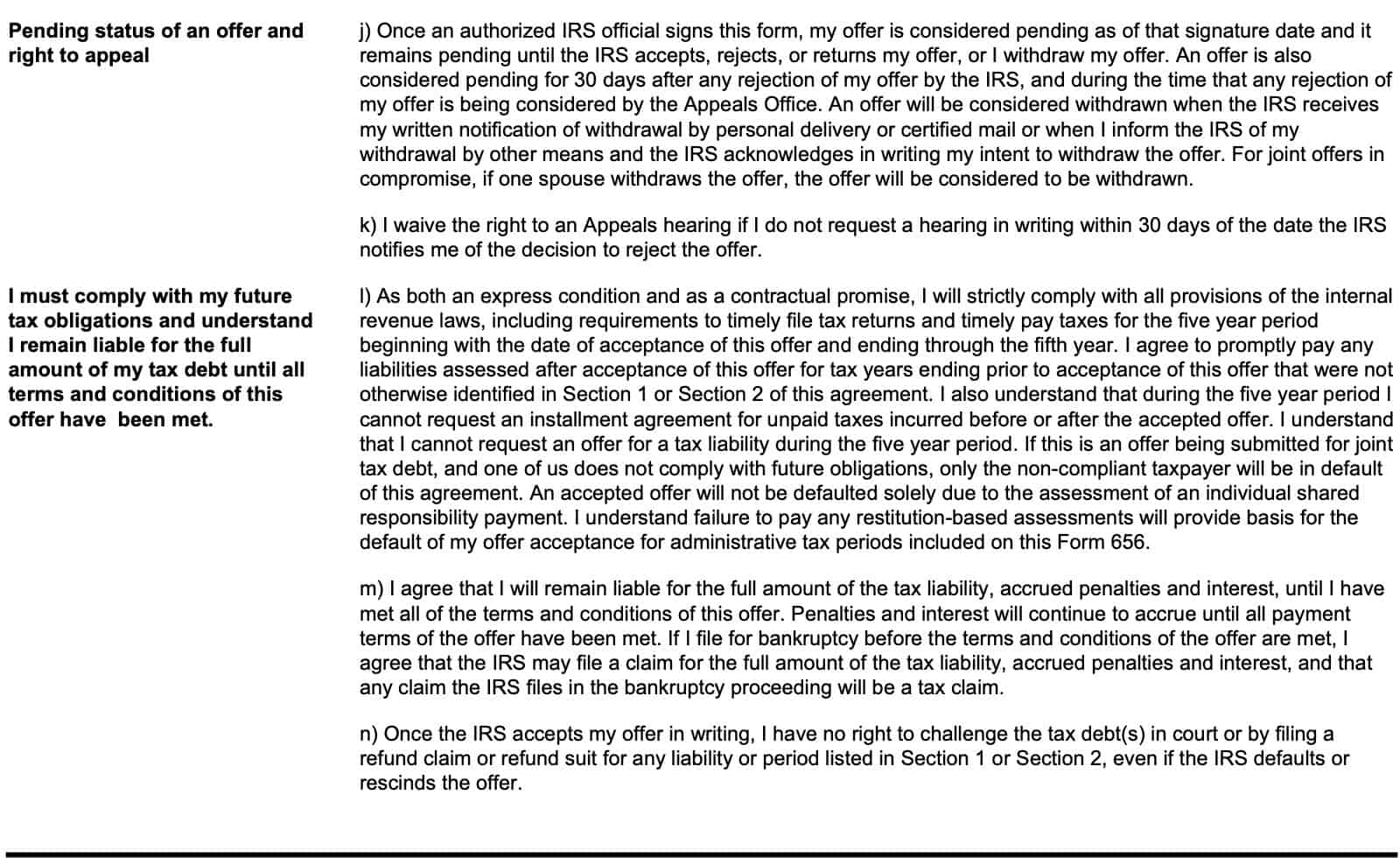
I must comply with my future tax obligations and understand I remain liable for the full amount of my tax debt until all terms and conditions of this offer have been met.
If you fail to meet any of the offer’s terms, then the IRS may:
- Revoke the certificate of release of federal tax lien
- File a new tax lien
- Levy or sue you to collect any amount up to the original amount of tax debt, plus penalties and interest (minus any payments already made)
The IRS will continue to apply interest, according to Internal Revenue Code Section 6601, which requires interest to be applied to tax debt.
Submitting false information or documents may cause the IRS to terminate your offer contract. This will result in becoming fully liable for the complete tax liability, accrued penalties, and interest.
I understand what will happen if I fail to meet the terms of my offer (e.g., default).
This section serves to emphasize a point previously made: if you fail to meet any of the terms of this offer, the IRS may do any of the following:
- Revoke the certificate of release of federal tax lien
- File a new notice of federal tax lien
- Levy assets or sue for any amount up to the original amount of the tax debt, plus penalties and interest, minus tax payments already made
- Continue to add interest on the amount that the Internal Revenue Service determines is still due after default
Additionally, if you provide false information or false documents, then the IRS may exercise its discretion with regards to your offer.
This includes terminating the offer contract, if the IRS determines that it is in the government’s best interest to do so. If the IRS terminates the offer contract, then you will be liable for the full amount of the tax liability, penalties, and interest.
I agree to waive time limits provided by law.
By making this agreement, you also agree to extend the time limit allowed by federal law to assess the tax debt. This is the statutory period of assessment. This includes agreeing to the following statement:
The date by which the IRS must assess the tax debt will now be extended by the period of time that the offer is outstanding, plus one additional year, if the IRS rejects, returns, or terminates the offer, or if the offer is withdrawn.
You do have the right to not waive the statutory period of assessment, or to limit the waiver. However, the IRS may not consider any submitted offers if you refuse to waive the statutory period of assessment or if you provide only a limited waiver. Also, the statutory period for tax debt collection will be suspended:
- While the submitted offer is pending with the IRS
- For 30 days after any IRS rejection of a submitted offer, and
- During the time that any rejected offer is being considered by the Independent Office of Appeals
By submitting this offer, you also
- Immediately withdraw any pending installment agreement request on file for all tax periods, and
- Understand that a pending installment agreement will not automatically be reinstated after the offer is closed
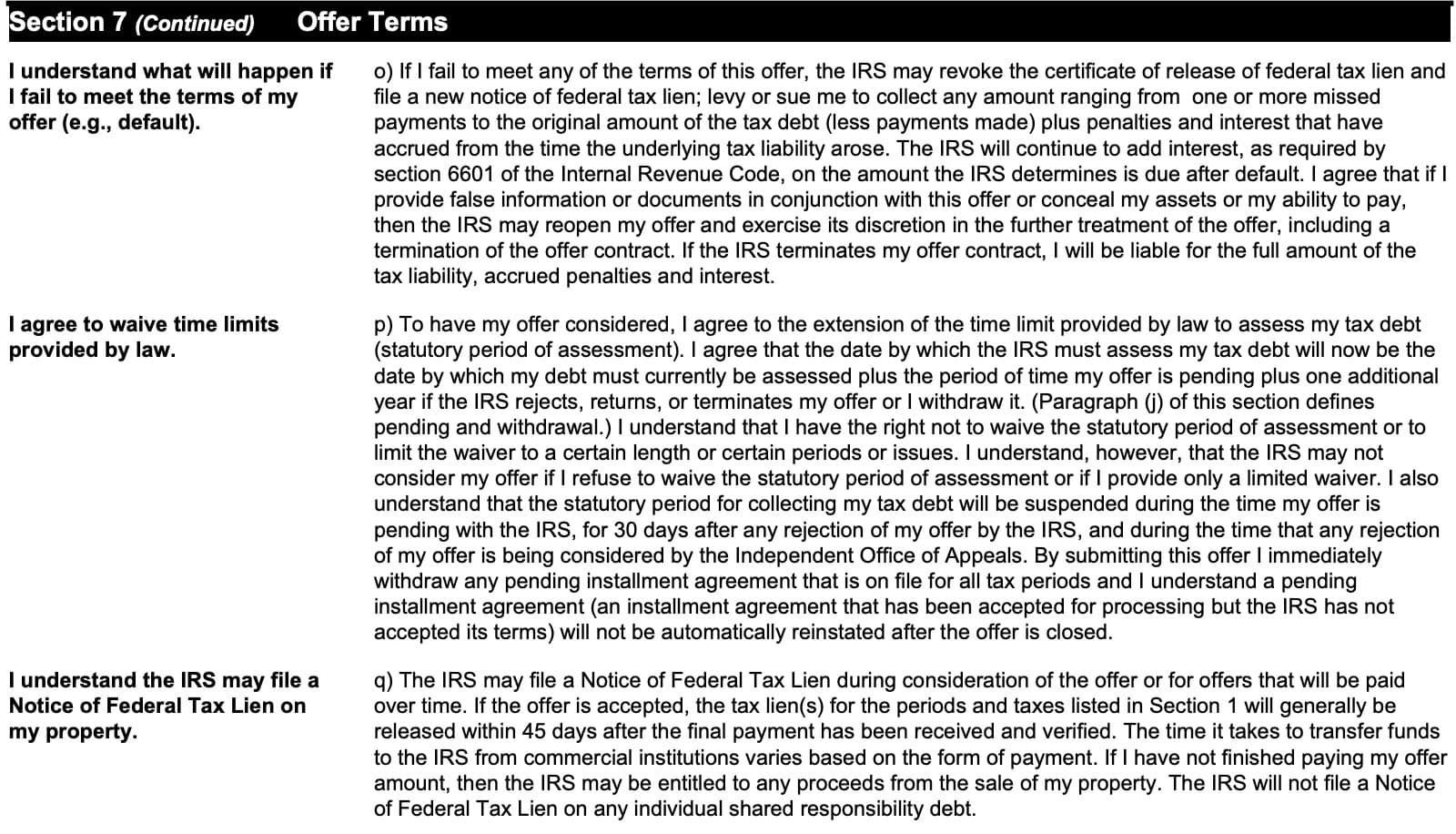
I understand the IRS may file a Notice of Federal Tax Lien on my property.
The IRS may also file a notice of federal tax lien while considering the offer, or for offers that are paid over time. If the offer is accepted, then the IRS will generally release the tax lien for the periods listed in Section 1 within 45 days of final payment receipt and verification.
If you have not finished paying the offer amount, then the IRS may be entitled to any proceeds from a property sale. The IRS will not file a notice of federal tax lien on any individual shared responsibility debt.
Correction agreement
This authorizes the IRS to correct any typos or clerical errors, or to make minor changes to the Form 656 submitted with an offer.
I authorize the IRS to contact relevant third parties in order to process my offer.
In this section, you authorize the Internal Revenue Service to contact third parties as part of the application process. However, you will not be notified of which third parties the IRS contacts during the application process, including tax periods that have not been assessed.
Also, you are authorizing the IRS to request a consumer report from a credit bureau.
I am submitting an offer as an individual for a joint liability.
If the liability is a joint and individual liability of yourself and another person, but you are submitting the offer for your individual liability only, then you are still responsible for the joint liability, even if the offer for individual liability is accepted.
I understand the IRS Shared Responsibility Payment (SRP).
This doesn’t really apply while the penalty for shared responsibility is zero. However, the shared responsibility payment still exists, even if there is no penalty.
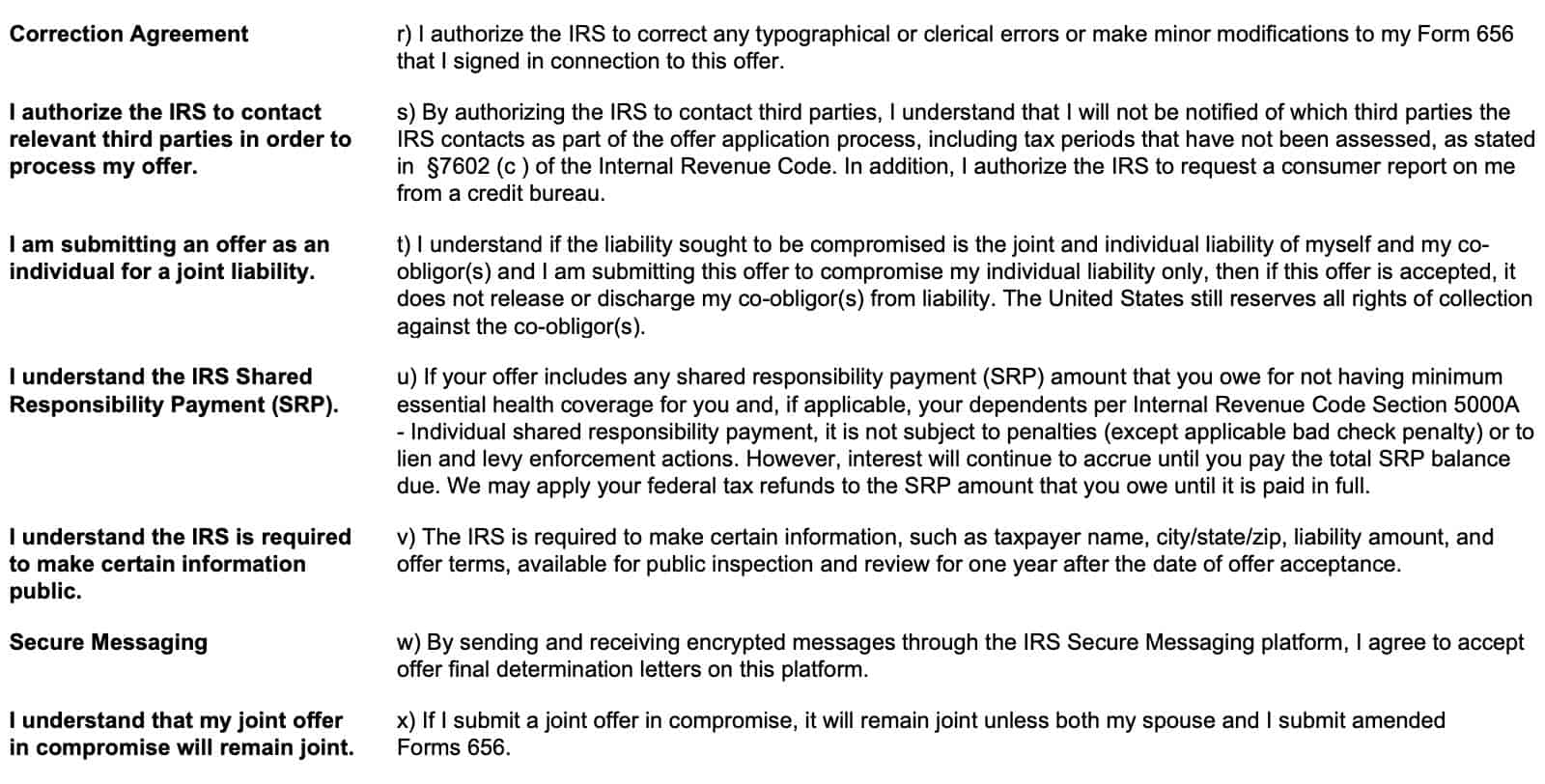
I understand the IRS is required to make certain information public.
The IRS must make certain information available for public inspection for one year after accepting an offer. This includes the following taxpayer information:
- Name
- City, state, and zip code
- Liability amount
- Offer terms
Secure Messaging
By sending and receiving encrypted messages through the IRS Secure Messaging platform, you agree to accept final determination letters through this platform as well.
I understand that my joint offer in compromise will remain joint
Finally, if you submit a joint offer in compromise, then it will remain a joint offer unless you and your spouse submit amended offers in compromise.
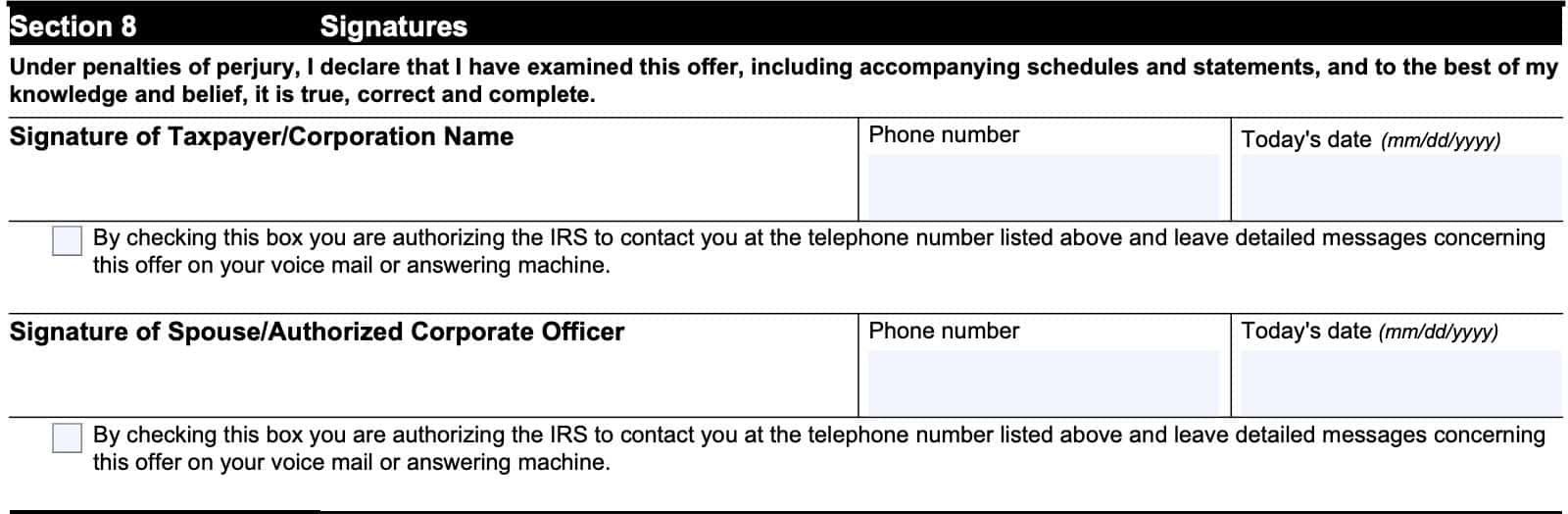
Section 8: Signatures
Assuming that you accept the terms in Section 7, sign and date where indicated below.
Be sure to enter the date and a telephone number in the spaces provided. Finally, check the applicable box to authorize the IRS to contact you at the listed telephone number and to leave messages about your offer via voicemail or answering machine.
Joint offers
For joint offers, both spouses must sign, date, and enter a telephone number where indicated.
Offers on behalf of a company
For a corporation, enter the corporation’s name in the first signature field, then sign where indicated under Authorized Corporate Officer.
Section 9: Paid preparer use only
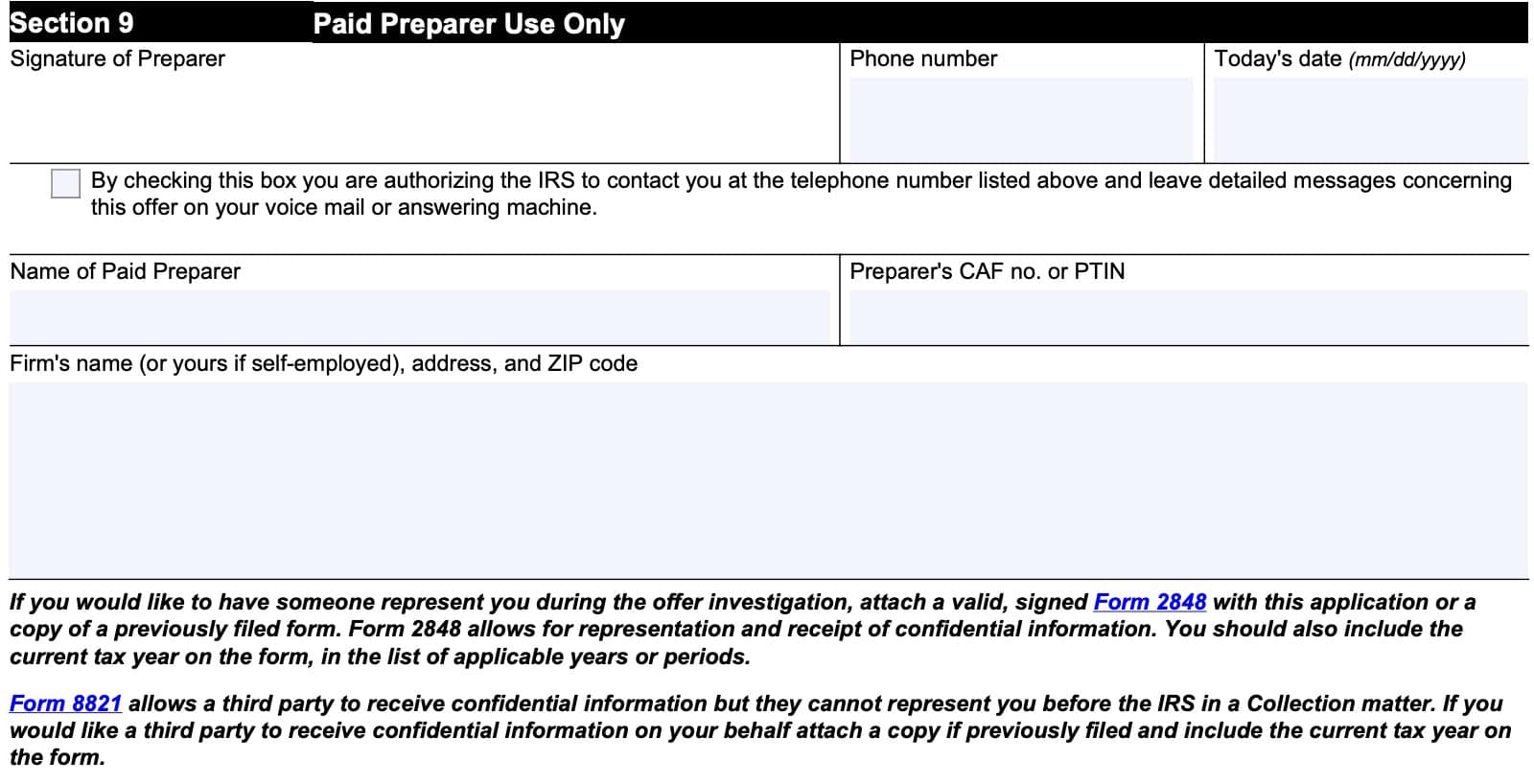
If you are preparing your own offer-in-compromise, you can skip this section. Otherwise, your tax professional will complete the following information fields:
- Preparer’s signature and telephone number
- Date of signature
- Tax preparer name and CAF number or PTIN
- Firm’s name, address, zip code
Tax professional representation
Some taxpayers may wish to have their tax professional represent them before the IRS for purposes of discussing or submitting an offer. You can do this by signing IRS Form 2848, Power of Attorney and Declaration of Representative, which will authorize the tax professional to perform specified duties on your behalf.
You may also authorize a third party to receive confidential information related to your Form 656 offer by signing IRS Form 8821, Tax Information Authorization. However, this does not grant any permission to represent you before the IRS. This only allows the third party to receive information as it pertains to specific topics or subjects that you have consented to release.
For IRS use only
Do not complete this section. The IRS revenue officer processing your offer will complete this information.

Filing considerations
There are some things you may choose to consider before submitting your offer.
Eligibility criteria
You’re eligible to apply for an offer in compromise if you:
- Filed all required tax returns and made all required estimated payments.
- Aren’t in an open bankruptcy proceeding.
- Have a valid extension for a current year return (if applying for the current year).
- Are an employer and made tax deposits for the current and past 2 quarters before you apply.
The IRS also has a self-help tool, called the Offer in Compromise Pre-Qualifier Tool, that you can use to estimate your eligibility for an offer.
To see the Pre-Qualifier tool in action, you can watch this brief YouTube video.
If you apply and are not eligible
If you apply for an offer in compromise and the IRS can’t process your offer or does not accept your offer, then the IRS will:
- Return your application and offer application fee.
- Apply any offer payment you included to your balance due.
In other words, if you submit an offer, you will receive your application fee back, but the IRS will keep any payment that you submitted.
For people who submitted an offer using the periodic payment (6 to 24 month payoff), you must keep making monthly payments until you receive a rejection or until you’ve made your final payment. If your offer is rejected, the IRS will keep all payments that you’ve made, and apply those payments to your tax balance.
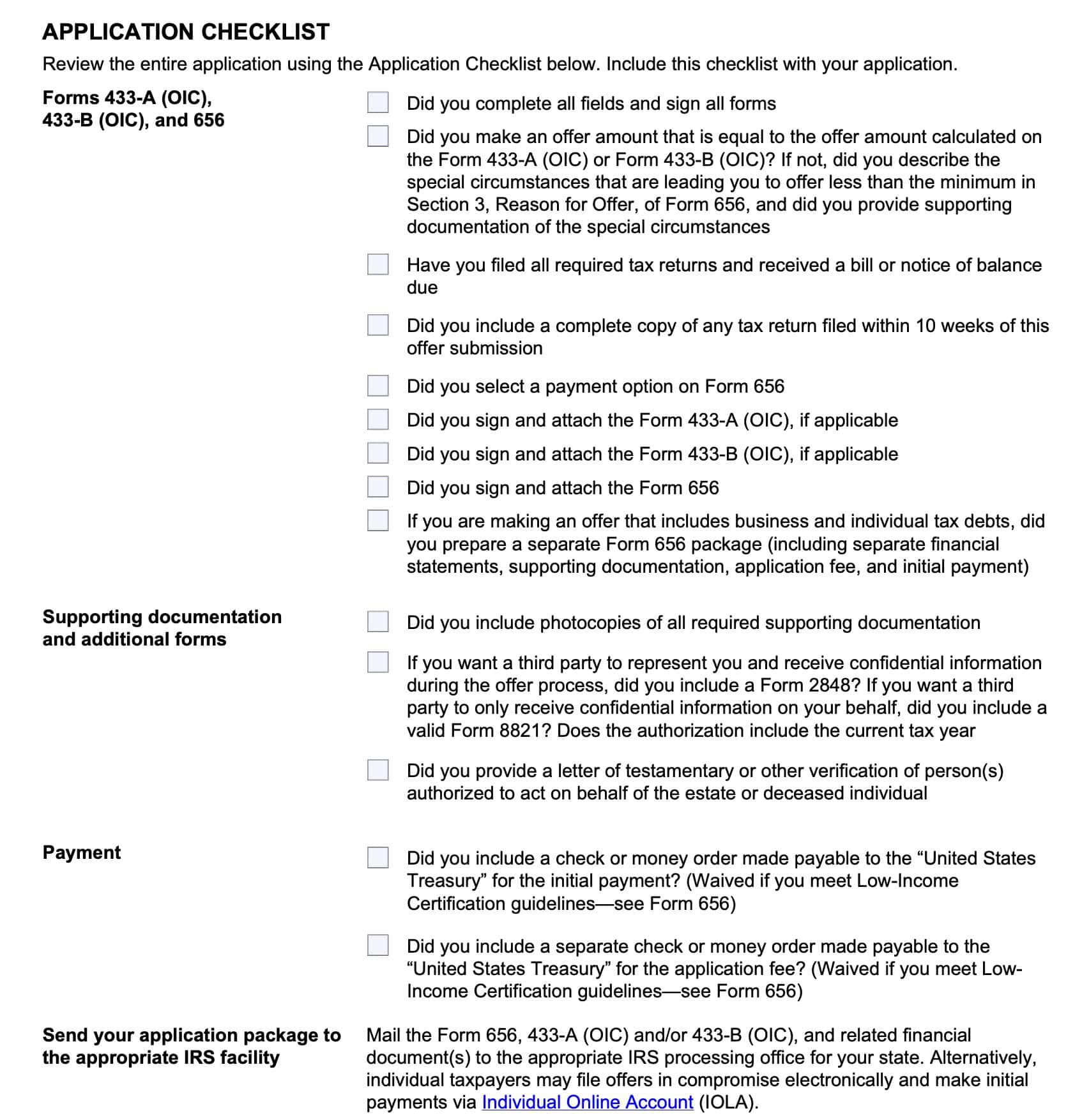
Use the eligibility checklist
IRS Form 656-B, Offer in Compromise Booklet, contains a checklist to help you make sure that your submitted offer is a complete one.
How to submit your application
You can complete an application package, which consists of:
- IRS Form 433-A, Collection Information Statement for Wage Earners and Self-Employed Individuals, or IRS Form 433-B, Collection Information Statement for Businesses
- Included all required documentation as indicated on the forms
- Form 656: You must submit individual and business tax debt on separate forms
- $205 application fee (non-refundable, unless your offer is rejected)
- Initial non-refundable payment for each Form 656
You can mail these to the applicable site
- Form 433-A (OIC) (individuals) or 433-B (OIC) (businesses) and all required documentation as specified on the forms.
- Form 656(s) – you must submit individual and business tax debt (Corporation/ LLC/ Partnership) on separate Forms 656.
- $205 application fee (non-refundable).
- Initial payment (non-refundable) for each Form 656.
Mail the above to the applicable site listed on Form 656-B PDF. You may submit your application package via email to one of the two designated sites.
You may also file your offer in compromise online, via your Individual Online Account.
Where to mail your offer in compromise
Mail your complete offer package to the correct IRS location, depending on the state where you live.
Memphis IRS Center COIC Unit
If you live in any of the following states, you will mail your offer to the Memphis IRS Center Centralized OIC Unit (COIC Unit)
- Arizona
- California
- Colorado
- Georgia
- Hawaii
- Idaho
- Kentucky
- Louisiana
- Mississippi
- New Mexico
- Nevada
- Oklahoma
- Oregon
- Tennesee
- Texas
- Utah
- Washington
Memphis IRS Center COIC Unit
P.O. Box 30803, AMC
Memphis, TN 38130-0803
844-398-5025
Brookhaven IRS Center COIC Unit
If you live in these states, mail your offer to the Brookhaven IRS Center COIC Unit:
- Alaska
- Alabama
- Arkansas
- Connecticut
- Washington DC
- Delaware
- Florida
- Iowa
- Illinois
- Indiana
- Kansas
- Massachusetts
- Maryland
- Maine
- Michigan
- Minnesota
- Missouri
- Montana
- North Carolina
- North Dakota
- Nebraska
- New Hampshire
- New Jersey
- New York
- Ohio
- Pennsylvania
- Puerto Rico
- Rhode Island
- South Carolina
- South Dakota
- Virginia
- Vermont
- Wisconsin
- West Virginia
- Wyoming
- Any foreign address
Brookhaven IRS Center COIC Unit
P.O. Box 9007
Holtsville, NY 11742-9007
Select a payment option
Your initial payment varies based on your offer and the payment option you choose:
- Lump sum
- Periodic payment
Lump Sum
Submit an initial payment of 20% of the total offer amount with your application.
If the IRS accepts your offer, you’ll receive written confirmation. You must pay any remaining balance due on the offer in five or fewer payments.
Periodic Payment
Submit your initial payment with your application.
Continue to pay the remaining balance in monthly installments while the IRS considers your offer. If IRS accepts your offer, continue to pay monthly until it is paid in full.
If you meet the low income certification guidelines
You don’t have to:
- Send the application fee or the initial payment.
- Make monthly installments while the IRS reviews your offer.
How the process works
If the IRS cannot process your offer, you will receive a notice in writing.
If the IRS can process your offer, they will send you a letter with the estimated date of contact. The letter might also request that you send additional information.
While IRS evaluates your offer:
- Your non-refundable payments and fees are applied to the tax liability. (You may designate payments to a specific tax year and tax debt.)
- IRS may file a notice of federal tax lien.
- IRS suspends other collection activities.
- Your legal assessment and collection period is extended.
- You make all required payments per your offer.
- You don’t have to make payments on an existing installment agreement.
- Your offer is automatically accepted if the IRS doesn’t make a determination within two years of the IRS receipt date.
- This does not include any appeal period.
If your offer is accepted
- You must meet all the offer terms listed in Section 7 of Form 656, including filing all required tax returns and making all payments.
- IRS doesn’t release federal tax liens until your offer terms are satisfied.
- Certain offer information is available for public review by requesting a copy of a public inspection file.
If your offer is rejected
- You may appeal a rejection within 30 days using IRS Form 13711, Request for Appeal of Offer in Compromise
- The IRS Independent Office of Appeals offers additional assistance on appealing your rejected offer.
Video walkthrough

Frequently asked questions
An offer in compromise occurs when a taxpayer offers the federal government a lower payment amount than his or her tax account balance indicates. The IRS may choose to accept an offer in compromise based upon economic hardship, insolvency, or public policy/equity reasons.
No. However, if you do use the tool, you greatly increase your chances of submitting an acceptable offer. There is nothing that states a taxpayer must use the pre-qualifier tool prior to offer submission.
Where can I find IRS Form 656?
You can find IRS Form 656 in several places on the IRS website. For your convenience, we’ve enclosed the latest version of IRS Form 656 below.
If you need collection information statements, you can download Form 656-B, below. This is the booklet that contains Form 656 and Forms 433, Collection Information Statement.