IRS Form 1045 Instructions
If you have certain net operating losses, tax overpayments, or business credits that you can carryback to prior tax years, you may be able to apply for a quick refund of taxes from the federal government by filing IRS Form 1045, Application for Tentative Refund.
In this comprehensive article, we’ll teach you exactly what you need to know to file your tentative refund claim. Let’s begin by walking through this tax form, step by step.
Table of contents
How do I complete IRS Form 1045?
IRS Form 1045 is a two-page tax form. For your convenience, we’ve broken this form down as follows:
Let’s begin with the taxpayer information fields at the top.
Taxpayer information
You will enter the following information at the top of your form, as it is shown on your income tax return. Your tax preparation software may not automatically enter this information for you.

Enter the following information:
- Taxpayer’s name, as shown on your income tax return
- Social Security number (SSN)
- If filing on behalf of an estate or trust, enter the employer identification number instead
- Spouse’s SSN, if filing jointly
- Complete mailing address, including:
- City
- State
- Zip code
Top of the form
At the top of IRS Form 1045, you’ll need to enter some information about your background.
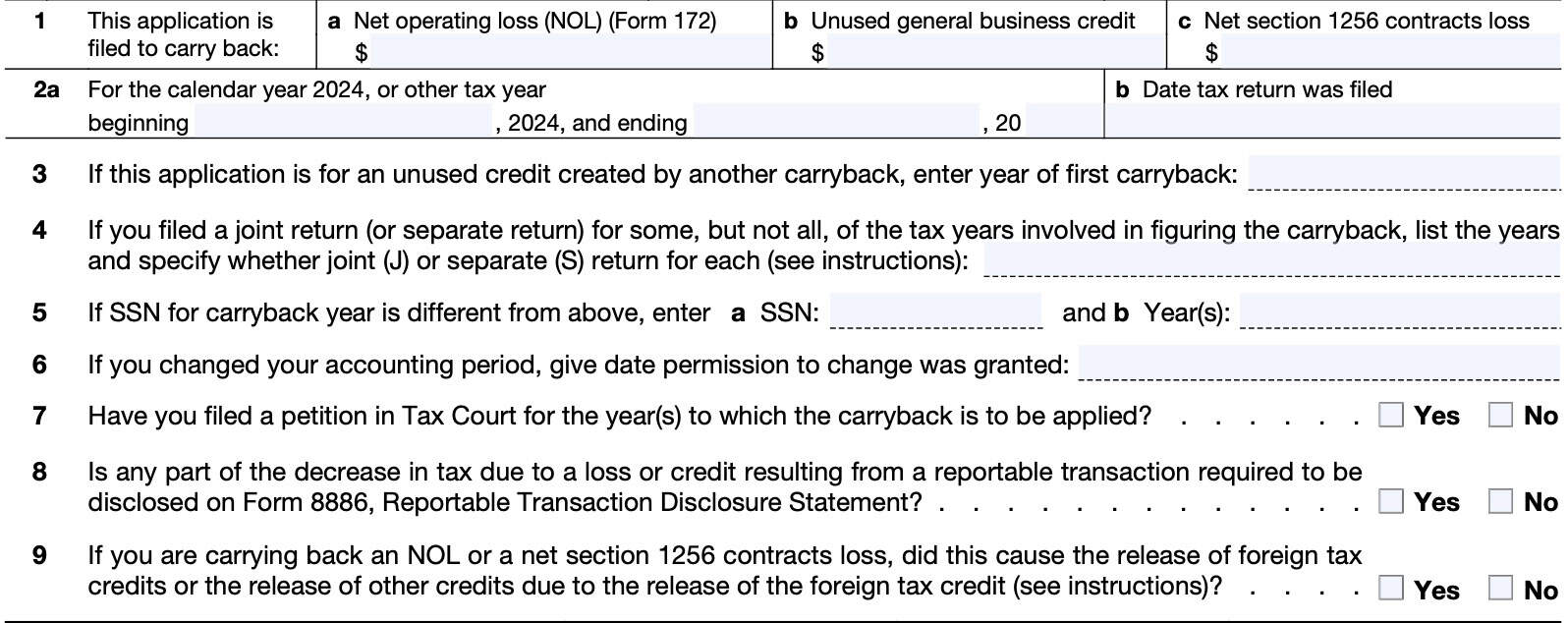
Line 1
In Line 1, enter the purpose for filing Form 1045. You can choose between any (or all) of the following:
- Line 1a: Net operating loss (NOL) carryforward
- Line 1b: Unused general business credit
- Line 1c: Net Section 1256 contracts loss
Let’s take a closer look at each.
Line 1a: NOL
If you are using a net operating loss (NOL) to reduce your tax bill, you’ll need to complete IRS Form IRS Form 172, Net Operating Losses, first. Once you’ve calculated the NOL amount, you can enter the number fromForm 172 in Line 1a.
Line 1b: Unused General business credit
If you’re claiming a tentative refund based on the carryback of an unused general business credit, you’ll need to attach your computation which shows:
- How you calculated the business credit carryback, and
- How you recomputed the credit after applying the carryback
In general, you must carryback any unused general business credits 1 year.
Joint filers
There are special rules for joint filers, depending on the tax year or tax years involved. If you filed a joint tax return in a carryback or carryforward year and your marital status or filing status has changed, you
may need to figure your separate tax liability in that carryback or carryforward year. This would apply if:
- You were married and filed a separate return in the credit year, but filed a joint return with the same or a different spouse in the carryback or carryforward year.
- You filed as single in the credit year, but filed a joint return in the carryback or carryforward year;
- You filed a joint return in the credit year, but filed a joint return with a different spouse in the carryback or carryforward year
Refer to the instructions for IRS Form 3800 for more detail.
Line 1c: Net section 1256 contracts loss
If applicable, individuals can carry back a net section 1256 contracts loss to each of the 3 prior years immediately preceding the loss year. For example, a loss occurring in tax year 2024 can be carried back to tax years 2021 through 2023.
However, estates and trusts cannot make this election. If you choose to make this election, keep in mind the following:
- You’ll have to check Box D at the top of IRS Form 6781, Gains and Losses From Section 1256 Contracts and Straddles
- Box D indicates a net section 1256 contracts loss election
- The amount of contracts loss that you use in a given tax year cannot exceed the net Section 1256 gain in that tax year
- The carryback should be reflected as a reduction to AGI in the ‘After carryback’ column on Line 11.
- Attach a copy of Form 6781 and Schedule D (Form 1040) for the year of the net Section 1256 contracts loss, as well as the amended Form 6781 and amended Schedule D for each carryback year
Line 2: Dates of tax year
In Line 2a, enter the dates of your fiscal year, if your tax year is different from the calendar year. Otherwise, leave blank.
For Line 2b, enter the date that you filed your federal income tax return.
Line 3
If your application is for an unused credit that another carryback created, enter the year of the first carryback.
Otherwise, leave blank.
Line 4
If you filed a joint return or separate return for some tax years, but not all tax years involved in determining the carryback, list the involved years and specify the type of tax returns for each year:
- Joint return: (J)
- Separate return: (S)
Line 5
If the SSN for a carryback year is different from the one you entered in the taxpayer information field, enter the SSN used in Line 5a.
In Line 5b, list the applicable tax year(s).
Line 6
If you changed your accounting period, give the date you received permission to change your accounting period. If not, leave blank.
Line 7
If you filed a petition in tax court for the carryback year(s), check Yes. Otherwise, check No.
Line 8
Are you required to file IRS Form 8886 to disclose any reportable transactions that caused a decrease in tax liability?
Check the appropriate box.
Line 9
For NOL carrybacks or net Section 1256 contracts loss, did this cause the release of foreign tax credits, or other credits due to the release of the foreign tax credit?
If so, you cannot use Form 1045 to carry the released foreign tax credits to earlier tax years. You also cannot use Form 1045 to carry any released general business tax credits to earlier years. In both situations, you must file an amended tax return.
Computation of decrease in tax
In Lines 10 through 32, we’ll calculate the decrease in your tax liability based upon the carryback.
However, if you did not enter any NOL (Line 1a) or net Section 1256 contracts loss (Line 1c), then you may skip Lines 10 through 15 and proceed directly to Line 16.
Before we start with Line 10, we’ll go over how to complete the columns for each line.
How to complete columns
For each line, you might see instructions marked:
- Before carryback
- After carryback
If the form instructions are the same for before and after carryback, you’ll simply find the instructions for each line, applicable to both ‘before carryback’ and ‘after carryback’ calculations.
Follow the directions for each column. Start with the first column. If an NOL isn’t fully absorbed in a year to which it is carried, you’ll need to complete IRS Form 172 to figure the amount to carry to the next carryback year.
Before beginning with Line 10, you must first use at least one pair of columns to enter the amounts before and after carryback for each year to which the loss or credit is being carried.
Example
Using a farming loss as an example in the figure below, for tax year 2023, you will need to enter tax year information in the first two columns. The earliest year goes into Column 1, while the next year goes into Column 2.
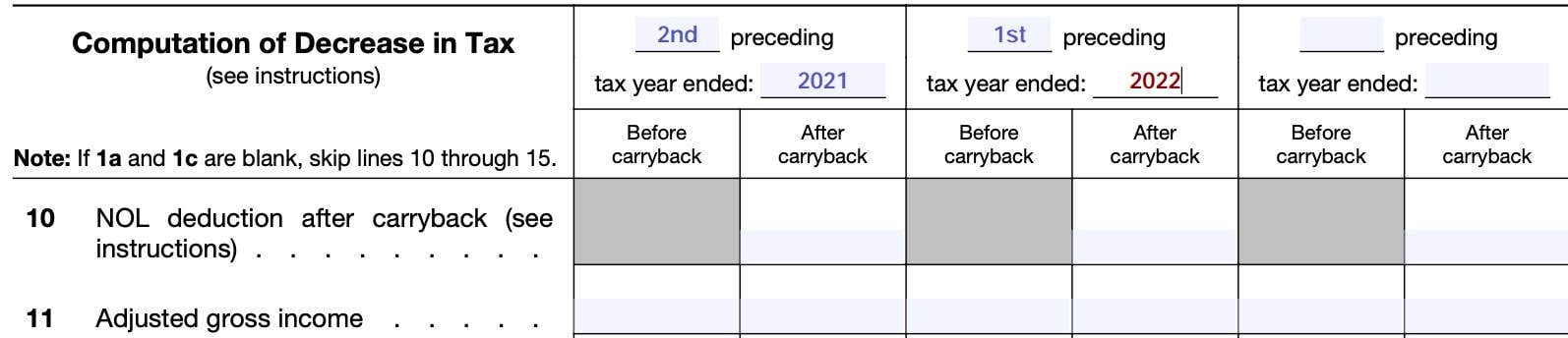
In Column 1, you would enter ‘2nd’ and 2021. This heading would read: “2nd preceding tax year ended 12/31/2021.” As the first preceding year, Column 2 would read: “1st preceding tax year ended 12/31/2022.”
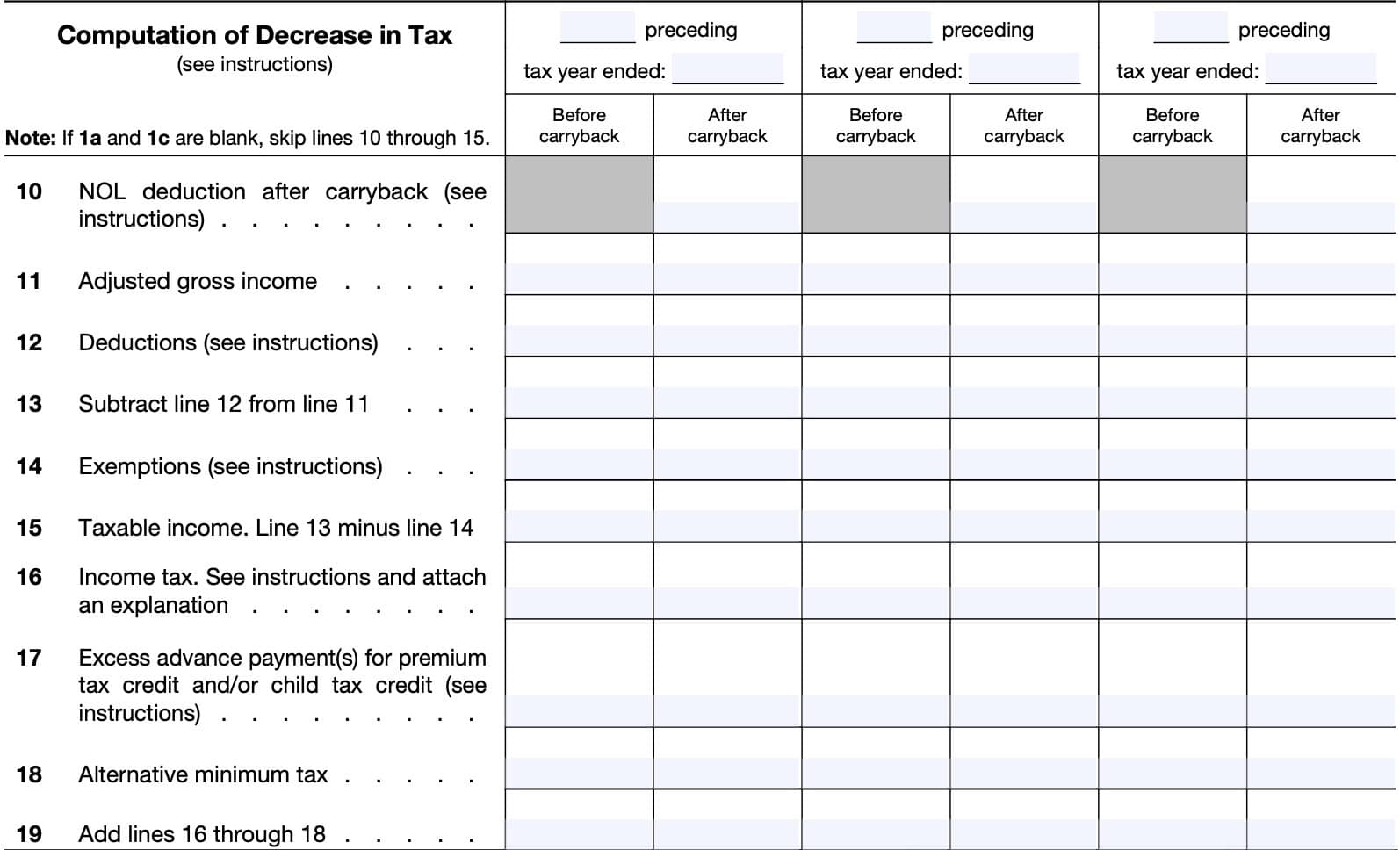
Line 10: NOL deduction after carryback
The form instructions contain several rules for you to figure the tax years to which you must carry an NOL shown on IRS Form 172.
General rule
Generally, only an NOL from some farming losses and an NOL of some insurance companies can be carried back 2 years.
Farming rule
The NOL carryback period for farming losses is 2 tax years. Any NOL not used in the previous tax years may be carried forward to the next tax year. Unused NOL losses may be carried forward indefinitely until used.
Special rule for joint filers
Special rules may exist for taxpayers who filed a joint return in some, but not all tax years.
Line 11: Adjusted gross income
Before carryback
Enter your AGI for the carryback year as shown on your original or amended tax return.
After carryback
Enter your recalculated AGI after applying:
- NOL amount
- Net Section 1256 contracts loss carry back
- Refigured items of income, credits, and deductions based on a percentage of AGI.
Refigured items may include:
- Special allowance for passive activity losses from rental real estate activities
- Taxable Social Security benefits
- IRA deductions
- Student loan interest deductions
- Tuition and fees deduction
- Child tax credit
- Excludable savings bond interest
- Exclusion of amounts received under an employer’s adoption assistance program
Line 12: Deductions
Before carryback
Include your deductions from AGI as shown on your income tax return.
After carryback
If you did not itemize deductions on Schedule A of your Form 1040, enter the standard tax deduction for the given tax year.
If you did itemize deductions, you may need to refigure any deductions based upon a percentage of AGI. To recalculate these deductions, use the refigured AGI from Line 11.
You might need to recalculate the following deductions:
- Medical expenses
- Mortgage insurance premiums
- Personal casualty & theft losses
- Miscellaneous deductions subject to 2% AGI limit (currently suspended)
Qualified business income (QBI) deductions
You also will need to refigure any QBI deduction using IRS Form 8995 or IRS Form 8995-A, and their associated schedules.
Line 13
Subtract Line 12 from Line 11. Enter the results here.
Line 14: Exemptions
Individual taxpayers
For individuals, the Tax Cuts and Jobs Act of 2017 reduced the personal exemption amount for tax years 2018 through 2025 to zero. In 2025, the One Big Beautiful Bill Act (OBBBA) made this a permanent change to the tax code.
Skip to Line 15.
Estates and trusts – Before carryback
Enter the amount from Form 1041, Line 21, for the applicable carryback year.
Estates and trusts – After carryback
Estates and trusts can enter the amount from Form 1041, Line 21, as previously adjusted, for the applicable carryback year.
Line 15: Taxable income
In both columns, you will calculate taxable income by subtracting Line 14 from Line 13.
Line 16: Income tax
Before carryback
Enter your income tax liability as originally calculated in the income tax return.
After carryback
Use the refigured taxable income number from Line 15 to recalculate your income tax. for each applicable carryback year. You may need to include any tax from either of the following:
- IRS Form 4970, Tax on Accumulation Distribution of Trusts, or
- IRS Form 4972, Tax on Lump-Sum Distributions
Also, attach any schedule used to calculate your tax, or an explanation of the method used to determine your new tax liability.
Line 17: Excess advance payment for premium tax credit or child tax credit
For the Premium Tax Credit (PTC), you will need to use IRS Form 8962, Premium Tax Credit, to recalculate the following for each column:
- Amount of PTC
- Advance PTC (APTC), and
- Excess APTC
Be sure to include the excess APTC for both Before carryback and After carryback columns.
Also include any excess advance payments of the child tax credit for carryback year 2021. For additional information, see the 2021 instructions for Schedule 8812.
Line 18: Alternative minimum tax
Any NOL carryback or net Section 1256 contract loss may cause or impact a taxpayer’s alternative minimum tax (AMT) situation.
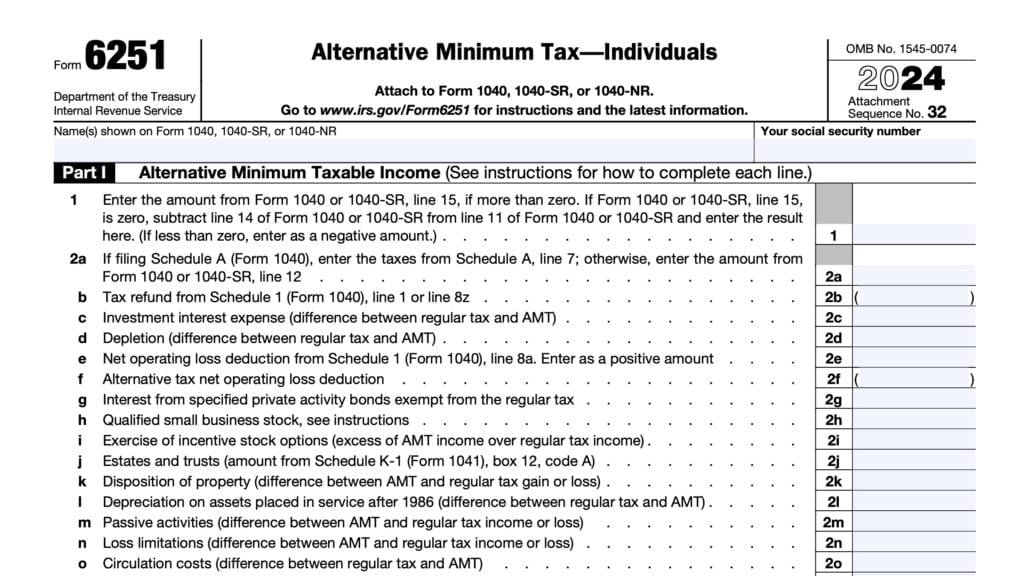
Individuals should use IRS Form 6251, Alternative Minimum Tax, to determine if the new calculation causes or increases AMT.
Estates and trusts will use Schedule I from Form 1041 to determine AMT changes.
Line 19
In both columns, add Lines 16 though 18 and enter the total in Line 19.
Line 20: General business credit
Before carryback
Enter any general business credit as shown on your original tax return.
After carryback
For each prior taxable year with a carryback, you’ll need to recalculate general business credits using IRS Form 3800, General Business Credit.
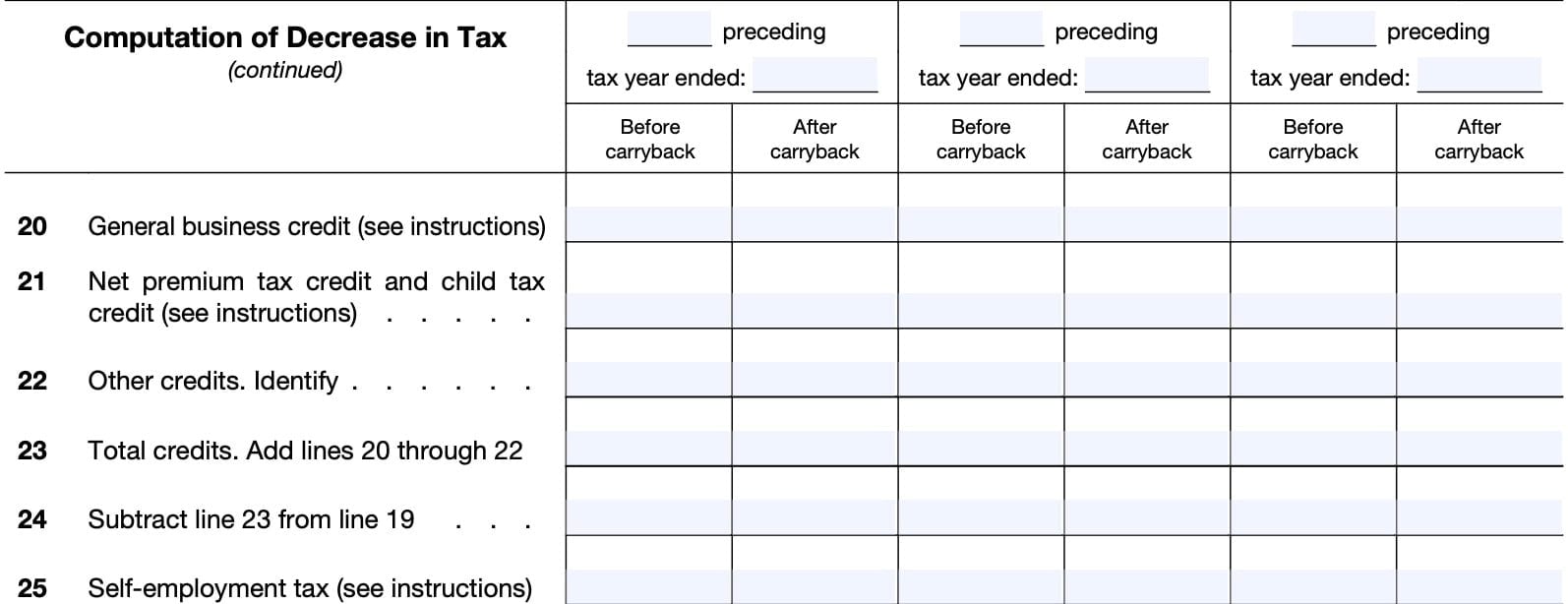
Line 21: Net premium tax credit and child tax credit
If you claimed a premium tax credit in the carryback year, complete a new Form 8962 using your refigured household income.
Enter your refigured premium tax credit in the column labeled After carryback for the carryback year. Include child tax credits on Line 21.
Prior Form 1045 versions
Editions of Form 1045 before the 2022 Form 1045 instructed taxpayers to include the child tax credit on Line 22 instead of Line 21. For future versions of Form 1045, do not include the child tax credits on Line 22.
Line 22: other credits
Refer to your tax return for any additional credits. A partial list of these tax credits includes:
- Earned income credit
- Credit for child and dependent care expenses
- Education credits
- Foreign tax credit
- Retirement savings contributions credit
If you make an entry in this line, please identify the credit(s) that you claim.
Before carryback
Enter the original credits from your income tax return.
After carryback
Refigure any tax credits based on AGI, modified AGI, or your tax liability. You’ll need to use your refigured AGI, modified AGI, or tax liability to recalculate your credits in each carryback year.
Line 23: Total credits
For each column, combine the totals from Lines 20 through 22 and enter this number in Line 23.
Line 24
For each column, subtract Line 23 from Line 19.
Line 25: Self-employment tax
Do not make any adjustments to self-employment tax because of a loss carryback.
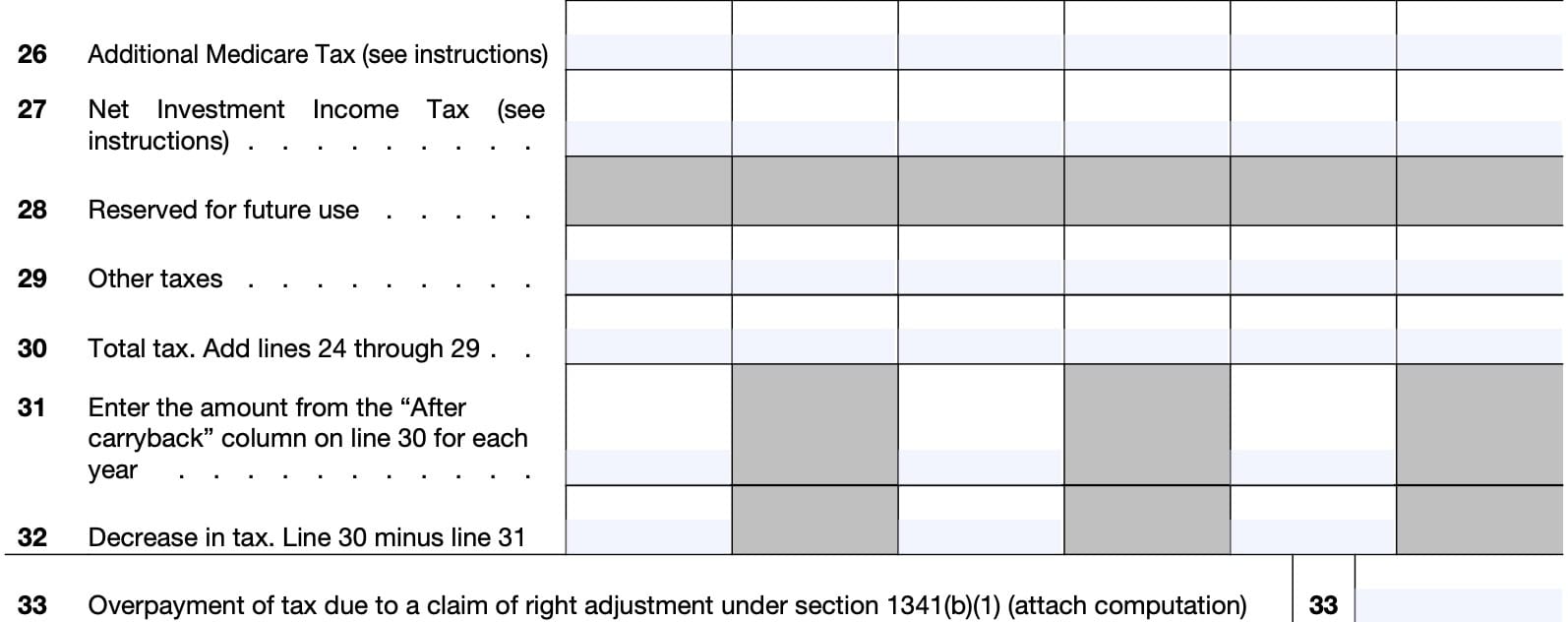
Line 26: Additional Medicare tax
Do not make any adjustments to Additional Medicare tax because of carrybacks.
Line 27: Net investment income tax
Before carryback
Enter the original net investment income tax (NIIT) as calculated on IRS Form 8960 for the applicable taxable year.
After carryback
For each affected carryback year, enter any refigured NIIT calculated on a revised Form 8960 for that taxable year. For more details, please see IRC Section 1411.
Line 28
Reserved for future use. Do not enter anything here.
Line 29: Other taxes
Review your tax return for previous years to identify other taxes not previously mentioned. If you make an entry on this line, you’ll need to identify the applicable taxes on this line.
Line 30: Total tax
For each column, add Lines 24 through 29. This is your total tax.
Line 31
Enter the amount from the After carryback column on Line 30 for each applicable tax year.
Line 32: Decrease in tax
Subtract Line 31 from Line 30 for each previous year.
Line 33: overpayment of tax due to a claim of right adjustment
If you’re applying for a tentative refund based upon an overpayment of tax under IRC Section 1341(b)(1), enter this amount on Line 33. Also, attach a computation showing the information required by Treasury Regulations Section 5.6411-1(d).
Taxpayer signature
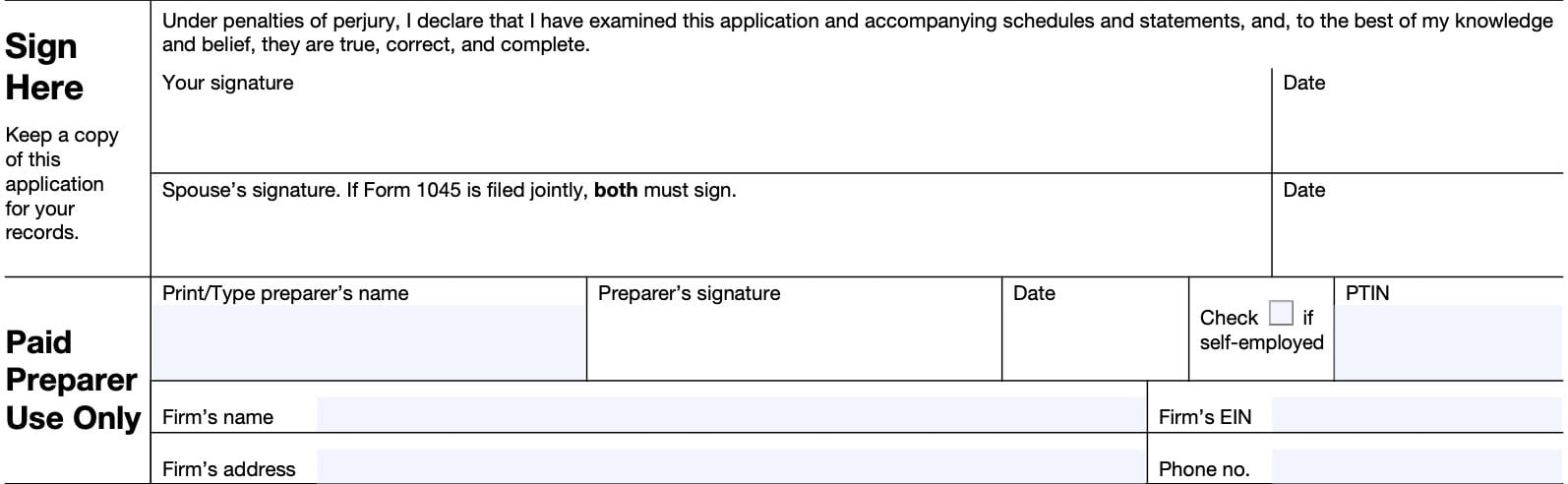
In the taxpayer’s signature field, sign and date the form. If you and your spouse are jointly filing Form 1045, then you and your spouse must both sign.
For estates and trusts, an estate executor or administrator, or trust fiduciary may sign the form.
Below your signature, your paid tax preparer may enter their personal information and sign.
Video walkthrough
Watch this instructional video as we walk through this tax form, step by step.

Frequently asked questions
Below are some commonly asked questions about Form 1045.
Taxpayers may use Form 1045 to claim a quick tax refund based on the carryback of a net operating loss (NOL), carryback of an unused general business credit, carryback of a net Section 1256 contracts loss, or an overpayment of tax due to a claim of right adjustment.
According to the IRS website, the IRS will process your application within 90 days of the later of:
• The date you file the complete application, or
• The last day of the month that includes the due date (including extensions) for filing your income tax return. For a claim of right adjustment, this becomes the date of the overpayment under Section 1341(b)(1).
A Section 1256 contract specifies an investment made in a derivatives instrument such that if the contract is held at year-end, it is treated as sold at fair market value at the end of the year.
The implied profit or loss from the fictitious sale is treated as short-term or long-term capital gains or losses, and reported on IRS Form 6781. Net Section 1256 contracts losses may be carried back or forwards, similar to NOL.
According to Section 1341(b)(1), an overpayment may exist when a taxpayer recognizes income during a given tax year, pays taxes based upon that income, then learns that he or she did not have a right to that income, after the end of the tax year. In such cases, a taxpayer may file for a tentative refund to claim this overpayment.
Where can I find IRS Form 1045?
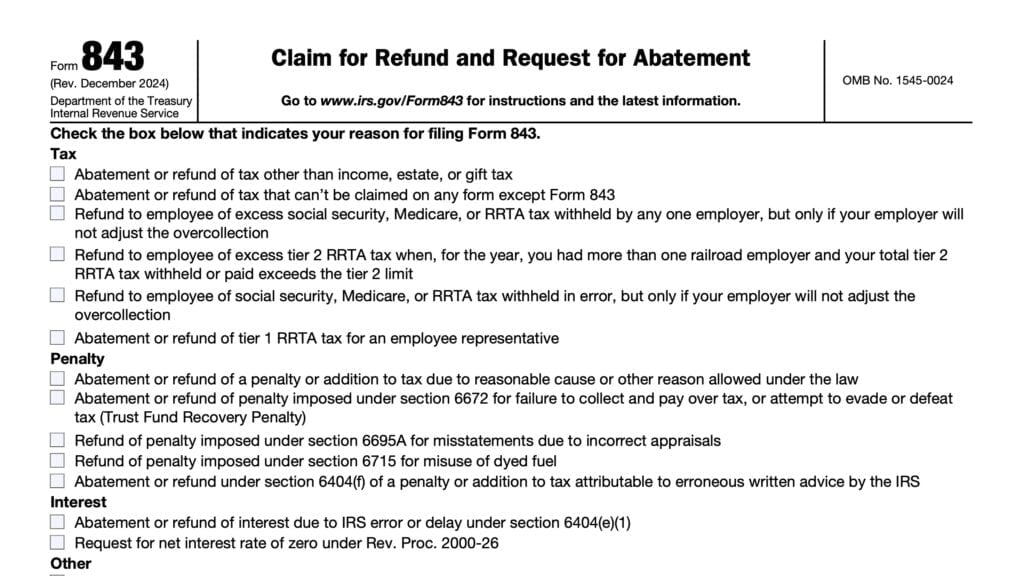
You may download this tax form from the IRS website. For your convenience, we’ve included the latest copy in this article.

Scenario:
You have a NOL (a negative number), and you subtract the standard deduction, and then enter the result on Schedule A Line 1 (resulting in a larger negative number. You then subtract the standard deduction that was entered in line 6, when it is carried through to line 9 (If line 6 is more than line 8, enter the difference. Otherwise, enter -0-)
So, in the simple scenario where the only adjustment to your AGI is a standard deduction, your AGI is unchanged. Is this correct?
A couple of clarifying questions, because I’m not exactly sure what you’re looking at:
1. This is a comment on Form 1045. Are you referring to this or IRS Form 172?
2. Schedule A? Of which form?
3. Line 6 includes standard deduction, but also includes other nonbusiness deductions.
However, in a scenario where the only adjustment to income is the standard deduction, then there is no change to AGI. Generally, the standard deduction is applied to AGI to arrive at taxable income. It does not change AGI itself.